---
title: "SendGrid to Resend"
slug: sendgrid
description: "A guide on how to quickly switch from SendGrid to Resend."
image: /static/migrate/sendgrid-og.jpg
hero_image: /static/migrate/sendgrid-resend.png
updated_at: "2024-11-28"
---

## Introduction

If you're considering migrating from SendGrid to Resend, you're in the right place.

This guide will help you understand the key differences between the two services and provide you with the necessary steps to make the transition as smooth as possible.

**Jump ahead**

- **[History](#history)**
- **[Concepts](#concepts)**
- **[Official SDKs](#official-sdks)**
- **[Send email via API](#send-email-via-api)**
- **[Send email via SMTP](#send-email-via-smtp)**
- **[Webhooks](#webhooks)**
- **[Security & Privacy](#security-privacy)**
- **[Idempotency Keys](#idempotency-keys)**
- **[Additional Features](#additional-features)**
- **[Pricing](#pricing)**
- **[Conclusion](#conclusion)**

## History

SendGrid and Resend are both email delivery services, but they have different histories and focuses.

**Key differences**

- SendGrid was founded in 2009. In 2019, [Twilio acquired SendGrid](https://www.twilio.com/en-us/press/releases/twilio-completes-acquisition-sendgrid).
- Resend was founded in 2023. Resend has a focus on providing a modern developer experience.

## Concepts

Both SendGrid and Resend provide user-friendly dashboards for managing your email sending.

**Sender Authentication**

In SendGrid you need to access the _Sender Authentication_ page to verify your domain. SendGrid then allows you to add a _Sender Identity_ by confirming an individual email address or authenticating a domain via DNS.

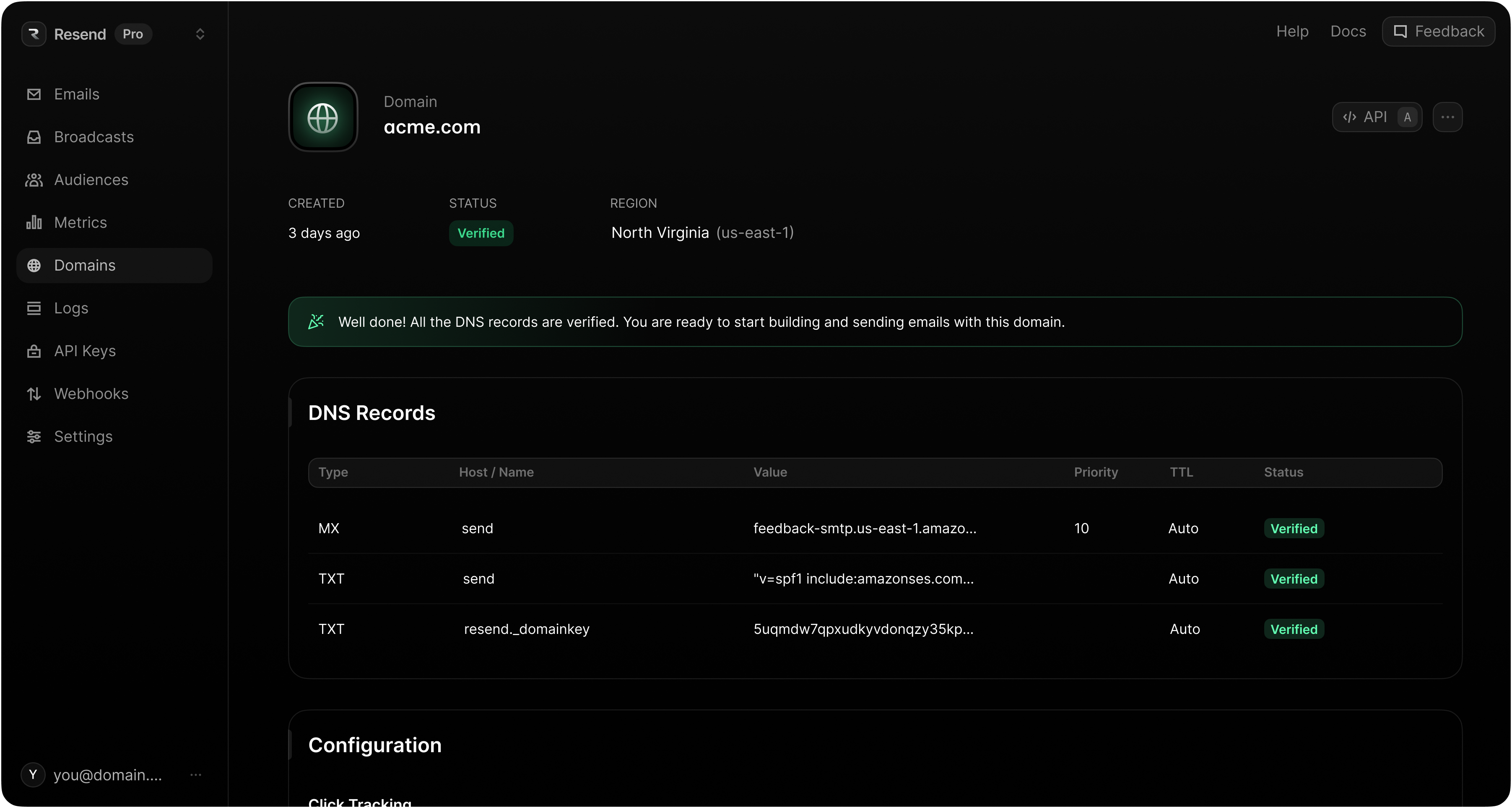
With Resend, domains are verified on the _Domains_ page.

<img
  src="/static/product-pages/screenshot-domain.png"
  alt="Resend Domains page"
  className="extraWidth"
/>

Both SendGrid and Resend offer similar authentication features.
<Table
  data={{
    headers: ["Name", "SendGrid", "Resend"],
    rows: [
      ["DKIM", "DKIM enforced", "DKIM enforced"],
      ["SPF", "SPF enforced", "SPF enforced"],
      ["DMARC", "DMARC recommended", "DMARC recommended"],
    ]
  }}
/>

**Activity Feed**

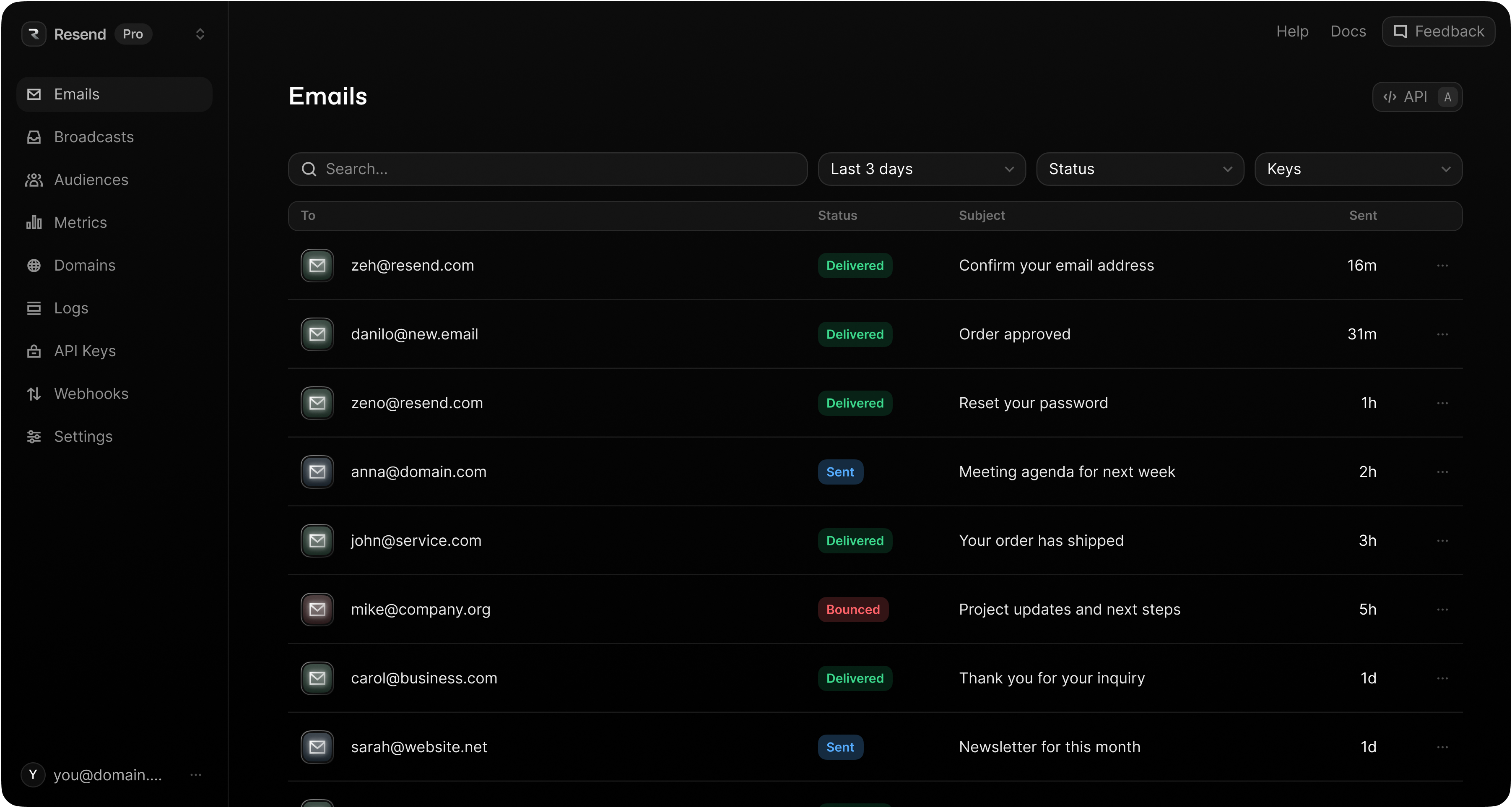
When you send email through SendGrid, sent email is visible on the _Activity_ page.

When you send email with Resend, emails are visible on the _Emails_ page.

<img
  src="/static/product-pages/screenshot-emails.png"
  alt="Resend Emails page"
  className="extraWidth"
/>

**Dashboard**

SendGrid shows sending statistics on the _Dashboard_ page.

In Resend, statistics are shown on the _Metrics_ page.
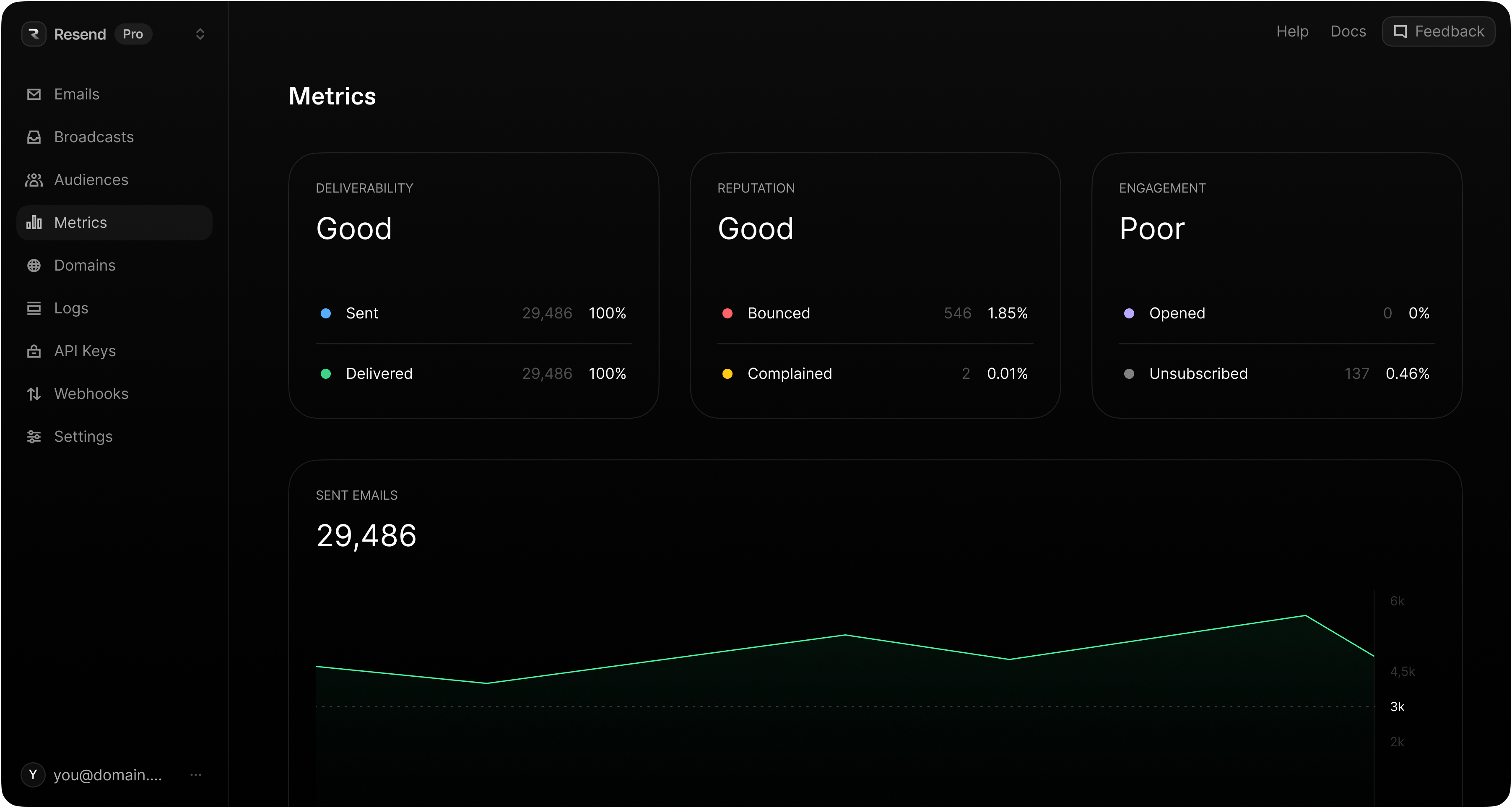
<img
  src="/static/product-pages/screenshot-metrics.png"
  alt="Resend Metrics page"
  className="extraWidth"
/>

## Official SDKs

Both SendGrid and Resend provide official SDKs for various programming languages, making it easy to integrate into your application.

**Key differences**

- SendGrid does not have an official Rust Library.

<Table
  data={{
    headers: ["Platform", "SendGrid", "Resend"],
    rows: [
      [
        "Node.js",
        {
          href: "https://github.com/sendgrid/sendgrid-nodejs",
          text: "sendgrid-nodejs"
        },
        { href: "https://github.com/resend/resend-node", text: "resend-node" }
      ],
      [
        "PHP",
        {
          href: "https://github.com/sendgrid/sendgrid-php",
          text: "sendgrid-php"
        },
        { href: "https://github.com/resend/resend-php", text: "resend-php" }
      ],
      [
        "Python",
        {
          href: "https://github.com/sendgrid/sendgrid-python",
          text: "sendgrid-python"
        },
        {
          href: "https://github.com/resend/resend-python",
          text: "resend-python"
        }
      ],
      [
        "Ruby",
        {
          href: "https://github.com/sendgrid/sendgrid-ruby",
          text: "sendgrid-ruby"
        },
        {
          href: "https://github.com/resend/resend-ruby",
          text: "resend-ruby"
        }
      ],
      [
        "Go",
        {
          href: "https://github.com/sendgrid/sendgrid-go",
          text: "sendgrid-go"
        },
        {
          href: "https://github.com/resend/resend-go",
          text: "resend-go"
        }
      ],
      [
        "Rust",
        "-",
        { href: "https://github.com/resend/resend-rust", text: "resend-rust" }
      ],
      [
        "Java",
        {
          href: "https://github.com/sendgrid/sendgrid-java",
          text: "sendgrid-java"
        },
        { href: "https://github.com/resend/resend-java", text: "resend-java" }
      ],
      [
        ".NET",
        {
          href: "https://github.com/sendgrid/sendgrid-csharp",
          text: "sendgrid-csharp"
        },
        { href: "https://github.com/resend/resend-dotnet", text: "resend-dotnet" }
      ]
    ]
  }}
/>

## Send email via API

Both SendGrid and Resend provide a REST API and SDKs for sending emails programmatically.

**Key differences**

_Mail Merge_

- SendGrid supports mail merge and templates for personalizations ([see docs](https://www.twilio.com/docs/sendgrid/for-developers/sending-email/personalizations)).
- Resend supports mail merge features when used with React Email ([see docs](https://react.email/docs/introduction)).

_Rate limiting_

- SendGrid throws an error when rate limit is exceeded, but doesn't provide more details ([see docs](https://www.twilio.com/docs/sendgrid/api-reference/how-to-use-the-sendgrid-v3-api/rate-limits)).
- Resend has response headers describing your current rate limit following every request in conformance with the IETF standard ([see docs](https://resend.com/docs/api-reference/introduction#rate-limit)).

_Logging_

- SendGrid's API only returns an HTTP response. There are no logs of API requests.
- Resend stores a history of API request logs, allowing for easy debugging of API responses and error codes ([see docs](https://resend.com/docs/api-reference/introduction#response-codes)).

_SendGrid_

<CodeTabs>
```nodejs
const sgMail = require('@sendgrid/mail');
sgMail.setApiKey(process.env.SENDGRID_API_KEY);
const msg = {
  to: 'receiver@example.com',
  from: 'sender@example.com',
  subject: 'hello world',
  html: '<p>it works!</p>',
};
sgMail.send(msg);
```

```ruby
require 'sendgrid-ruby'
include SendGrid

from = SendGrid::Email.new(email: 'sender@example.com')
to = SendGrid::Email.new(email: 'receiver@example.com')
subject = 'hello world'
content = SendGrid::Content.new(type: 'text/html', value: '<p>it works!</p>')
mail = SendGrid::Mail.new(from, subject, to, content)

sg = SendGrid::API.new(api_key: ENV['SENDGRID_API_KEY'])
response = sg.client.mail._('send').post(request_body: mail.to_json)
puts response.status_code
puts response.body
puts response.parsed_body
puts response.headers
```

```php
$email = new \SendGrid\Mail\Mail();
$email->setFrom("sender@example.com");
$email->setSubject("hello world");
$email->addTo("receiver@example.com");
$email->addContent(
    "text/html", "<p>it works!</p>"
);
$sendgrid = new \SendGrid(getenv('SENDGRID_API_KEY'));
try {
    $response = $sendgrid->send($email);
    print $response->statusCode() . "\n";
    print_r($response->headers());
    print $response->body() . "\n";
} catch (Exception $e) {
    echo 'Caught exception: '. $e->getMessage() ."\n";
}
```

```python
import sendgrid
import os
from sendgrid.helpers.mail import *

sg = sendgrid.SendGridAPIClient(api_key=os.environ.get('SENDGRID_API_KEY'))
from_email = Email("sender@example.com")
to_email = To("receiver@example.com")
subject = "hello world"
content = Content("text/html", "<p>it works!</p>")
mail = Mail(from_email, to_email, subject, content)
response = sg.client.mail.send.post(request_body=mail.get())
print(response.status_code)
print(response.body)
print(response.headers)
```

```go
package main

import (
	"fmt"
	"log"
	"os"

	"github.com/sendgrid/sendgrid-go"
	"github.com/sendgrid/sendgrid-go/helpers/mail"
)

func main() {
	from := mail.NewEmail("sender@example.com")
	subject := "hello world"
	to := mail.NewEmail("receiver@example.com")
	htmlContent := "<p>it works!</p>"
	message := mail.NewSingleEmail(from, subject, to, htmlContent)
	client := sendgrid.NewSendClient(os.Getenv("SENDGRID_API_KEY"))
	response, err := client.Send(message)
	if err != nil {
		log.Println(err)
	} else {
		fmt.Println(response.StatusCode)
		fmt.Println(response.Body)
		fmt.Println(response.Headers)
	}
}
```

```rust
// No official SendGrid SDK for Rust
```

```java
import com.sendgrid.*;
import java.io.IOException;

public class Example {
  public static void main(String[] args) throws IOException {
    Email from = new Email("sender@example.com");
    String subject = "hello world";
    Email to = new Email("receiver@example.com");
    Content content = new Content("text/html", "<p>it works!</p>");
    Mail mail = new Mail(from, subject, to, content);

    SendGrid sg = new SendGrid(System.getenv("SENDGRID_API_KEY"));
    Request request = new Request();
    try {
      request.setMethod(Method.POST);
      request.setEndpoint("mail/send");
      request.setBody(mail.build());
      Response response = sg.api(request);
      System.out.println(response.getStatusCode());
      System.out.println(response.getBody());
      System.out.println(response.getHeaders());
    } catch (IOException ex) {
      throw ex;
    }
  }
}
```

```dotnet
using SendGrid;
using SendGrid.Helpers.Mail;

var apiKey = Environment.GetEnvironmentVariable("SENDGRID_API_KEY");
var client = new SendGridClient(apiKey);
var from = new EmailAddress("test@example.com", "Example User");
var subject = "Sending with Twilio SendGrid is Fun";
var to = new EmailAddress("test@example.com", "Example User");
var plainTextContent = "and easy to do anywhere, even with C#";
var htmlContent = "<strong>and easy to do anywhere, even with C#</strong>";
var msg = MailHelper.CreateSingleEmail(from, to, subject, plainTextContent, htmlContent);
var response = await client.SendEmailAsync(msg).ConfigureAwait(false);
```

```curl
curl --request POST \\
	 --url https://api.sendgrid.com/v3/mail/send \\
	 --header "Authorization: Bearer $SENDGRID_API_KEY" \\
	 --header 'Content-Type: application/json' \\
	 --data '{
     "personalizations": [
        {
            "to": [
                {
                    "email": "receiver@example.com"
                }
            ]
        }
    ],
    "from": {
        "email": "sender@example.com",
        "subject": "hello world",
        "content": [
            {
                "type": "text/html",
                "value": "<p>it works!</p>"
            }
        ]
    }
}'
```
</CodeTabs>

_Resend_

<CodeTabs>
```nodejs
import { Resend } from 'resend';

const resend = new Resend('re_xxxxxxxxx');

await resend.emails.send({
  from: 'Acme <onboarding@resend.dev>',
  to: ['delivered@resend.dev'],
  subject: 'hello world',
  html: '<p>it works!</p>',
});
```

```ruby
require "resend"

Resend.api_key = "re_xxxxxxxxx"

params = {
  "from": "Acme <onboarding@resend.dev>",
  "to": ["delivered@resend.dev"],
  "subject": "hello world",
  "html": "<p>it works!</p>"
}

sent = Resend::Emails.send(params)
puts sent
```

```php
$resend = Resend::client('re_xxxxxxxxx');

$resend->emails->send([
  'from' => 'Acme <onboarding@resend.dev>',
  'to' => ['delivered@resend.dev'],
  'subject' => 'hello world',
  'html' => '<p>it works!</p>'
]);
```

```python
import resend

resend.api_key = "re_xxxxxxxxx"

params: resend.Emails.SendParams = {
  "from": "Acme <onboarding@resend.dev>",
  "to": ["delivered@resend.dev"],
  "subject": "hello world",
  "html": "<p>it works!</p>"
}

email = resend.Emails.send(params)
print(email)
```

```go
import (
	"fmt"

	"github.com/resend/resend-go/v2"
)

func main() {
  ctx := context.TODO()
  client := resend.NewClient("re_xxxxxxxxx")

  params := &resend.SendEmailRequest{
      From:        "Acme <onboarding@resend.dev>",
      To:          []string{"delivered@resend.dev"},
      Subject:     "hello world",
      Html:        "<p>it works!</p>"
  }

  sent, err := client.Emails.SendWithContext(ctx, params)

  if err != nil {
    panic(err)
  }
  fmt.Println(sent.Id)
}
```

```rust
use resend_rs::types::{CreateEmailBaseOptions};
use resend_rs::{Resend, Result};

#[tokio::main]
async fn main() -> Result<()> {
  let resend = Resend::new("re_xxxxxxxxx");

  let from = "Acme <onboarding@resend.dev>";
  let to = ["delivered@resend.dev"];
  let subject = "hello world";
  let html = "<p>it works!</p>";

  let email = CreateEmailBaseOptions::new(from, to, subject)
    .with_html(html);

  let _email = resend.emails.send(email).await?;

  Ok(())
}
```

```java
import com.resend.*;

public class Main {
    public static void main(String[] args) {
        Resend resend = new Resend("re_xxxxxxxxx");

        CreateEmailOptions params = CreateEmailOptions.builder()
                .from("Acme <onboarding@resend.dev>")
                .to("delivered@resend.dev")
                .subject("hello world")
                .html("<p>it works!</p>")
                .build();

        CreateEmailResponse data = resend.emails().send(params);
    }
}
```

```dotnet
using Resend;

IResend resend = ResendClient.Create( "re_xxxxxxxxx" );

var resp = await resend.EmailSendAsync( new EmailMessage()
{
    From = "Acme <onboarding@resend.dev>",
    To = "delivered@resend.dev",
    Subject = "hello world",
    HtmlBody = "<p>it works!</p>",
} );
Console.WriteLine( "Email Id={0}", resp.Content );
```

```curl
curl -X POST 'https://api.resend.com/emails' \\
     -H 'Authorization: Bearer re_xxxxxxxxx' \\
     -H 'Content-Type: application/json' \\
     -d $'{
    "from": "Acme <onboarding@resend.dev>",
    "to": ["delivered@resend.dev"],
    "subject": "hello world",
    "html": "<p>it works!</p>"
}'
```
</CodeTabs>

## Send email via SMTP

Both SendGrid and Resend support sending emails via SMTP.

SMTP stands for Simple Mail Transfer Protocol. It is a text-based protocol in which one server communicates with another to send an email.

**Key differences**

_Configurations_

- SendGrid does not support port 2465 ([see docs](https://www.twilio.com/docs/sendgrid/for-developers/sending-email/integrating-with-the-smtp-api)).
- SendGrid supports adding customizations via the `X-SMTPAPI` header ([see docs](https://www.twilio.com/docs/sendgrid/for-developers/sending-email/building-an-x-smtpapi-header)).

<Table
  data={{
    headers: ["Configuration", "SendGrid", "Resend"],
    rows: [
      [
        "Host",
        "`smtp.sendgrid.net`",
        "`smtp.resend.com`"
      ],
      ["Port", "25, 465, 587, or 2525", "25, 465, 587, 2465, or 2587"],
      [
        "Username",
        "The `apikey` string",
        "The '`resend`' string"
      ],
      ["Password", "SendGrid API Key", "Resend API key"],
      [
        "Authentication",
        "Plain text (unencrypted), SSL, or TLS",
        "SMTPS or STARTTLS"
      ]
    ]
  }}
/>

## Webhooks

Both SendGrid and Resend provide webhooks to notify your application of email events.

**Key differences**

- SendGrid has support for oAuth via webhooks ([see docs](https://www.twilio.com/docs/sendgrid/for-developers/tracking-events/getting-started-event-webhook)).
- Resend has logs of webhook requests, allowing you to see the status of your webhook responses ([see docs](https://resend.com/docs/dashboard/webhooks/introduction#3-test-that-your-webhook-endpoint-is-working-properl)).

<Table
  data={{
    headers: ["Event", "SendGrid", "Resend"],
    rows: [
      [
        "Inbound",
        {
          href: "https://www.twilio.com/docs/sendgrid/for-developers/parsing-email/inbound-email",
          text: "inbound"
        },
        {
          href: "https://resend.com/docs/dashboard/receiving/introduction",
          text: "Inbound"
        }
      ],
      [
        "Send",
        {
          href: "https://www.twilio.com/docs/sendgrid/for-developers/tracking-events/event#processed",
          text: "processed"
        },
        {
          href: "https://resend.com/docs/dashboard/webhooks/event-types#email-sent",
          text: "email.sent"
        }
      ],
      [
        "Dropped",
        {
          href: "https://www.twilio.com/docs/sendgrid/for-developers/tracking-events/event#dropped",
          text: "dropped"
        },
        "-"
      ],
      [
        "Delivery",
        {
          href: "https://www.twilio.com/docs/sendgrid/for-developers/tracking-events/event#delivered",
          text: "delivered"
        },
        {
          href: "https://resend.com/docs/dashboard/webhooks/event-types#email-delivered",
          text: "email.delivered"
        }
      ],
      [
        "Delivery Delayed",
        {
          href: "https://www.twilio.com/docs/sendgrid/for-developers/tracking-events/event#deferred",
          text: "deferred"
        },
        {
          href: "https://resend.com/docs/dashboard/webhooks/event-types#email-delivery-delayed",
          text: "email.delivery_delayed"
        }
      ],
      [
        "Bounces",
        {
          href: "https://www.twilio.com/docs/sendgrid/for-developers/tracking-events/event#bounce",
          text: "bounce"
        },
        {
          href: "https://resend.com/docs/dashboard/webhooks/event-types#email-bounced",
          text: "email.bounced"
        }
      ],
      [
        "Complaints",
        {
          href: "https://www.twilio.com/docs/sendgrid/for-developers/tracking-events/event#spam-report",
          text: "spamreport"
        },
        {
          href: "https://resend.com/docs/dashboard/webhooks/event-types#email-complained",
          text: "email.complained"
        }
      ],
      [
        "Open Tracking",
        {
          href: "https://www.twilio.com/docs/sendgrid/for-developers/tracking-events/event#open",
          text: "open"
        },
        {
          href: "https://resend.com/docs/dashboard/webhooks/event-types#email-opened",
          text: "email.opened"
        }
      ],
      [
        "Click Tracking",
        {
          href: "https://www.twilio.com/docs/sendgrid/for-developers/tracking-events/event#click",
          text: "click"
        },
        {
          href: "https://resend.com/docs/dashboard/webhooks/event-types#email-clicked",
          text: "email.clicked"
        }
      ],
      [
        "Unsubscribe",
        {
          href: "https://www.twilio.com/docs/sendgrid/for-developers/tracking-events/event#unsubscribe",
          text: "unsubscribe"
        },
        {
          href: "https://resend.com/docs/dashboard/webhooks/event-types#contact-updated",
          text: "contact.updated"
        }
      ]
    ]
  }}
/>

## Security & Privacy

SendGrid and Resend have robust and similar security features.

<Table
  data={{
    headers: ["Name", "SendGrid", "Resend"],
    rows: [
      ["Authentication", "Email/Password, Google", "Email/Password, Google, GitHub"],
      ["Multi-Factor Auth", "MFA available", "MFA available"],
      [  "GDPR",
        {
          href: "https://www.twilio.com/docs/sendgrid/glossary/gdpr",
          text: "GDPR compliant"
        },
        {
          href: "https://resend.com/security/gdpr",
          text: "GDPR compliant"
        }
      ],
      [
        "SOC 2",
        {
          href: "https://sendgrid.com/en-us/policies/security",
          text: "SOC 2 compliant"
        },
        {
          href: "https://resend.com/security/soc-2",
          text: "SOC 2 compliant"
        }
      ]
    ]
  }}
/>

## Idempotency Keys

Resend supports idempotency keys on the `POST /emails` and `POST /emails/batch` endpoints.

> SendGrid does not currently support idempotency keys.

An idempotent operation is an action you can perform more than once, with the same input, and it always produces the same outcome and avoids repeating side effects.

By adding an `Idempotency-Key` header, or using the equivalent field on our SDKs, you can tell Resend that this specific email should only be sent once, even if we get more than one request from you about it.

`POST /emails`

<CodeTabs>

```nodejs
await resend.emails.send(
  {
    from: 'Acme <onboarding@resend.dev>',
    to: ['delivered@resend.dev'],
    subject: 'hello world',
    html: '<p>it works!</p>',
  },
  {
    idempotencyKey: 'welcome-user/123456789',
  },
);
```

```php
$resend = Resend::client('re_xxxxxxxxx');

$resend->emails->send([
  'from' => 'Acme <onboarding@resend.dev>',
  'to' => ['delivered@resend.dev'],
  'subject' => 'hello world',
  'html' => '<p>it works!</p>',
], [
  'idempotency_key' => 'welcome-user/123456789',
]);
```

```python
params: resend.Emails.SendParams = {
  "from": "Acme <onboarding@resend.dev>",
  "to": ["delivered@resend.dev"],
  "subject": "hello world",
  "html": "<p>it works!</p>"
}

options: resend.Emails.SendOptions = {
  "idempotency_key": "welcome-user/123456789",
}

resend.Emails.send(params, options)
```

```ruby
params = {
  "from": "Acme <onboarding@resend.dev>",
  "to": ["delivered@resend.dev"],
  "subject": "hello world",
  "html": "<p>it works!</p>"
}
Resend::Emails.send(
  params,
  options: { idempotency_key: "welcome-user/123456789" }
)
```

```go
ctx := context.TODO()
params := &resend.SendEmailRequest{
  From:    "onboarding@resend.dev",
  To:      []string{"delivered@resend.dev"},
  Subject: "hello world",
  Html:    "<p>it works!</p>",
}
options := &resend.SendEmailOptions{
  IdempotencyKey: "welcome-user/123456789",
}
_, err := client.Emails.SendWithOptions(ctx, params, options)
if err != nil {
  panic(err)
}
```

```rust
use resend_rs::types::CreateEmailBaseOptions;
use resend_rs::{Resend, Result};

#[tokio::main]
async fn main() -> Result<()> {
  let resend = Resend::new("re_xxxxxxxxx");

  let from = "Acme <onboarding@resend.dev>";
  let to = ["delivered@resend.dev"];
  let subject = "Hello World";

  let email = CreateEmailBaseOptions::new(from, to, subject)
    .with_html("<p>it works!</p>")
    .with_idempotency_key("welcome-user/123456789");

  let _email = resend.emails.send(email).await?;

  Ok(())
}
```

```java
CreateEmailOptions params = CreateEmailOptions.builder()
  .from("Acme <onboarding@resend.dev>")
  .to("delivered@resend.dev")
  .subject("hello world")
  .html("<p>it works!</p>")
  .build();


RequestOptions options = RequestOptions.builder()
  .setIdempotencyKey("welcome-user/123456789").build();

CreateEmailResponse data = resend.emails().send(params, options);
```

```dotnet
using Resend;

IResend resend = ResendClient.Create( "re_xxxxxxxxx" );

var key = IdempotencyKey.New<int>( "welcome-user", 123456789 );
var resp = await resend.EmailSendAsync(key, new EmailMessage()
{
    From = "Acme <onboarding@resend.dev>",
    To = "delivered@resend.dev",
    Subject = "hello world",
    HtmlBody = "<p>it works!</p>",
} );
Console.WriteLine( "Email Id={0}", resp.Content );
```

```curl
curl -X POST 'https://api.resend.com/emails' \
     -H 'Authorization: Bearer re_xxxxxxxxx' \
     -H 'Content-Type: application/json' \
     -H 'Idempotency-Key: welcome-user/123456789' \
     -d $'{
  "from": "Acme <onboarding@resend.dev>",
  "to": ["delivered@resend.dev"],
  "subject": "hello world",
  "html": "<p>it works!</p>"
}'
```

</CodeTabs>

`POST /emails/batch`

<CodeTabs codeHeight={450}>

```nodejs
import { Resend } from 'resend';

const resend = new Resend('re_xxxxxxxxx');

await resend.batch.send(
  [
    {
      from: 'Acme <onboarding@resend.dev>',
      to: ['foo@gmail.com'],
      subject: 'hello world',
      html: '<h1>it works!</h1>',
    },
    {
      from: 'Acme <onboarding@resend.dev>',
      to: ['bar@outlook.com'],
      subject: 'world hello',
      html: '<p>it works!</p>',
    },
  ],
  {
    idempotencyKey: 'team-quota/123456789',
  },
);
```

```php
$resend = Resend::client('re_xxxxxxxxx');

$resend->batch->send(
  [
    [
      'from' => 'Acme <onboarding@resend.dev>',
      'to' => ['foo@gmail.com'],
      'subject' => 'hello world',
      'html' => '<h1>it works!</h1>',
    ],
    [
      'from' => 'Acme <onboarding@resend.dev>',
      'to' => ['bar@outlook.com'],
      'subject' => 'world hello',
      'html' => '<p>it works!</p>',
    ]
  ],
  [
    'idempotency_key' => 'team-quota/123456789',
  ]
);
```

```python
import resend
from typing import List

resend.api_key = "re_xxxxxxxxx"

params: List[resend.Emails.SendParams] = [
  {
    "from": "Acme <onboarding@resend.dev>",
    "to": ["foo@gmail.com"],
    "subject": "hello world",
    "html": "<h1>it works!</h1>",
  },
  {
    "from": "Acme <onboarding@resend.dev>",
    "to": ["bar@outlook.com"],
    "subject": "world hello",
    "html": "<p>it works!</p>",
  }
]

options: resend.Batch.SendOptions = {
  "idempotency_key": "team-quota/123456789",
}

resend.Batch.send(params, options)
```

```ruby
require "resend"

Resend.api_key = 're_xxxxxxxxx'

params = [
  {
    "from": "Acme <onboarding@resend.dev>",
    "to": ["foo@gmail.com"],
    "subject": "hello world",
    "html": "<h1>it works!</h1>",
  },
  {
    "from": "Acme <onboarding@resend.dev>",
    "to": ["bar@outlook.com"],
    "subject": "world hello",
    "html": "<p>it works!</p>",
  }
]

Resend::Batch.send(
  params,
  options: { idempotency_key: "team-quota/123456789" }
)
```

```go
package examples

import (
	"fmt"
	"os"

	"github.com/resend/resend-go/v2"
)

func main() {

  ctx := context.TODO()

  client := resend.NewClient("re_xxxxxxxxx")

  var batchEmails = []*resend.SendEmailRequest{
    {
      From:    "Acme <onboarding@resend.dev>",
      To:      []string{"foo@gmail.com"},
      Subject: "hello world",
      Html:    "<h1>it works!</h1>",
    },
    {
      From:    "Acme <onboarding@resend.dev>",
      To:      []string{"bar@outlook.com"},
      Subject: "world hello",
      Html:    "<p>it works!</p>",
    },
  }

  options := &resend.BatchSendEmailOptions{
    IdempotencyKey: "team-quota/123456789",
  }

  sent, err := client.Batch.SendWithOptions(ctx, batchEmails, options)

  if err != nil {
    panic(err)
  }
  fmt.Println(sent.Data)
}
```

```rust
use resend_rs::types::CreateEmailBaseOptions;
use resend_rs::{Resend, Result};

#[tokio::main]
async fn main() -> Result<()> {
  let resend = Resend::new("re_xxxxxxxxx");

  let emails = vec![
    CreateEmailBaseOptions::new(
      "Acme <onboarding@resend.dev>",
      vec!["foo@gmail.com"],
      "hello world",
    )
    .with_html("<h1>it works!</h1>"),
    CreateEmailBaseOptions::new(
      "Acme <onboarding@resend.dev>",
      vec!["bar@outlook.com"],
      "world hello",
    )
    .with_html("<p>it works!</p>"),
  ];

  let _emails = resend.batch.send_with_idempotency_key(emails, "team-quota/123456789").await?;

  Ok(())
}
```

```java
import com.resend.*;

public class Main {
    public static void main(String[] args) {
        Resend resend = new Resend("re_xxxxxxxxx");

        CreateEmailOptions firstEmail = CreateEmailOptions.builder()
            .from("Acme <onboarding@resend.dev>")
            .to("foo@gmail.com")
            .subject("hello world")
            .html("<h1>it works!</h1>")
            .build();

        CreateEmailOptions secondEmail = CreateEmailOptions.builder()
            .from("Acme <onboarding@resend.dev>")
            .to("bar@outlook.com")
            .subject("world hello")
            .html("<p>it works!</p>")
            .build();

        CreateBatchEmailsResponse data = resend.batch().send(
            Arrays.asList(firstEmail, secondEmail),
            Map.of("idempotency_key", "team-quota/123456789")
        );
    }
}
```

```dotnet
using Resend;

IResend resend = ResendClient.Create( "re_xxxxxxxxx" ); // Or from DI

var key = IdempotencyKey.New<int>( "team-quota", 123456789 );

var mail1 = new EmailMessage()
{
    From = "Acme <onboarding@resend.dev>",
    To = "foo@gmail.com",
    Subject = "hello world",
    HtmlBody = "<p>it works!</p>",
};

var mail2 = new EmailMessage()
{
    From = "Acme <onboarding@resend.dev>",
    To = "bar@outlook.com",
    Subject = "hello world",
    HtmlBody = "<p>it works!</p>",
};

var resp = await resend.EmailBatchAsync(key, [ mail1, mail2 ] );
Console.WriteLine( "Nr Emails={0}", resp.Content.Count );
```

```curl
curl -X POST 'https://api.resend.com/emails/batch' \
     -H 'Authorization: Bearer re_xxxxxxxxx' \
     -H 'Content-Type: application/json' \
     -H 'Idempotency-Key: team-quota/123456789' \
     -d $'[
  {
    "from": "Acme <onboarding@resend.dev>",
    "to": ["foo@gmail.com"],
    "subject": "hello world",
    "html": "<h1>it works!</h1>"
  },
  {
    "from": "Acme <onboarding@resend.dev>",
    "to": ["bar@outlook.com"],
    "subject": "world hello",
    "html": "<p>it works!</p>"
  }
]'
```

</CodeTabs>

Adding idempotency keys not only helps you avoid sending duplicate emails and using up your quota, but also enables building more robust and scalable systems.

<LinkCard
  title="Idempotency Keys"
  description="Learn how to send an idempotent email using Resend."
  url="https://resend.com/docs/dashboard/emails/idempotency-keys"
  image="https://cdn.resend.com/posts/idempotency-keys.jpg"
/>

## Additional Features

Outside of core email sending, Resend offers additional features that SendGrid does not have that may be helpful for you.

**Deliverability Insights**

Improve your chances of landing in the inbox instead of the spam folder with detailed recommendations on each email sent.

<LinkCard
  title="Deliverability Insights"
  description="Improve email deliverability by identifying issues and applying best practices."
  url="/blog/deliverability-insights"
  image="https://cdn.resend.com/posts/deliverability-insights.jpg"
/>

**Multi-Region**

Improve your email deliverability speed by using a region nearest to your users.

<LinkCard
  title="Faster Email Delivery with Multi-Region"
  description="Faster deliverability with reduced latency."
  url="/blog/multi-region"
  image="https://cdn.resend.com/posts/multi-region.jpg"
/>

## Pricing

SendGrid and Resend offer competitive pricing based on the number of emails sent.

**Key differences**

- **SendGrid doesn't offer a free tier like Resend**. Their free plan is only valid for 60 days.
- SendGrid limits the number of team members on the essentials plan to 1 user.

<Table
  data={{
    headers: ["Emails", "SendGrid", "Resend"],
    rows: [
      ["3,000", "$19.95*", "$0"],
      ["50,000", "$19.95", "$20"],
      ["100,000", "$34.95", "$35"],
      ["200,000", "$249", "$160"],
      ["500,000", "$499", "$350"],
      ["1,000,000", "$799", "$650"],
      ["1,500,000", "$799", "$825"],
      ["2,500,000", "$1,099", "$1,050"],
    ]
  }}
/>

_\* You can send up to 100 emails per day for free for 60 days. Beyond that, you'll need a $19.95 plan with Sendgrid._

## Conclusion

Ready to migrate to Resend? Press `S` to get started. If there's anything else we can help with, contact our team, and we'll answer any questions you have.
