---
title: "Official n8n Node for Resend"
slug: official-n8n-node-for-resend
description: "You can now send emails, manage contacts, and trigger workflows from n8n."
created_at: "2026-02-20"
updated_at: "2026-02-20"
image: https://cdn.resend.com/posts/n8n-node-for-resend.jpg
humans: ["silke-pilon"]
---
Today, we are proud to announce the [official Resend node for n8n](https://n8n.io/integrations/resend/).
**Email has always been central to automation.** And when you combine the reliability and developer-first experience of Resend with the composability of n8n, something genuinely useful emerges.
You can now send emails, manage contacts, trigger workflows from email events, and much more, all from within n8n.
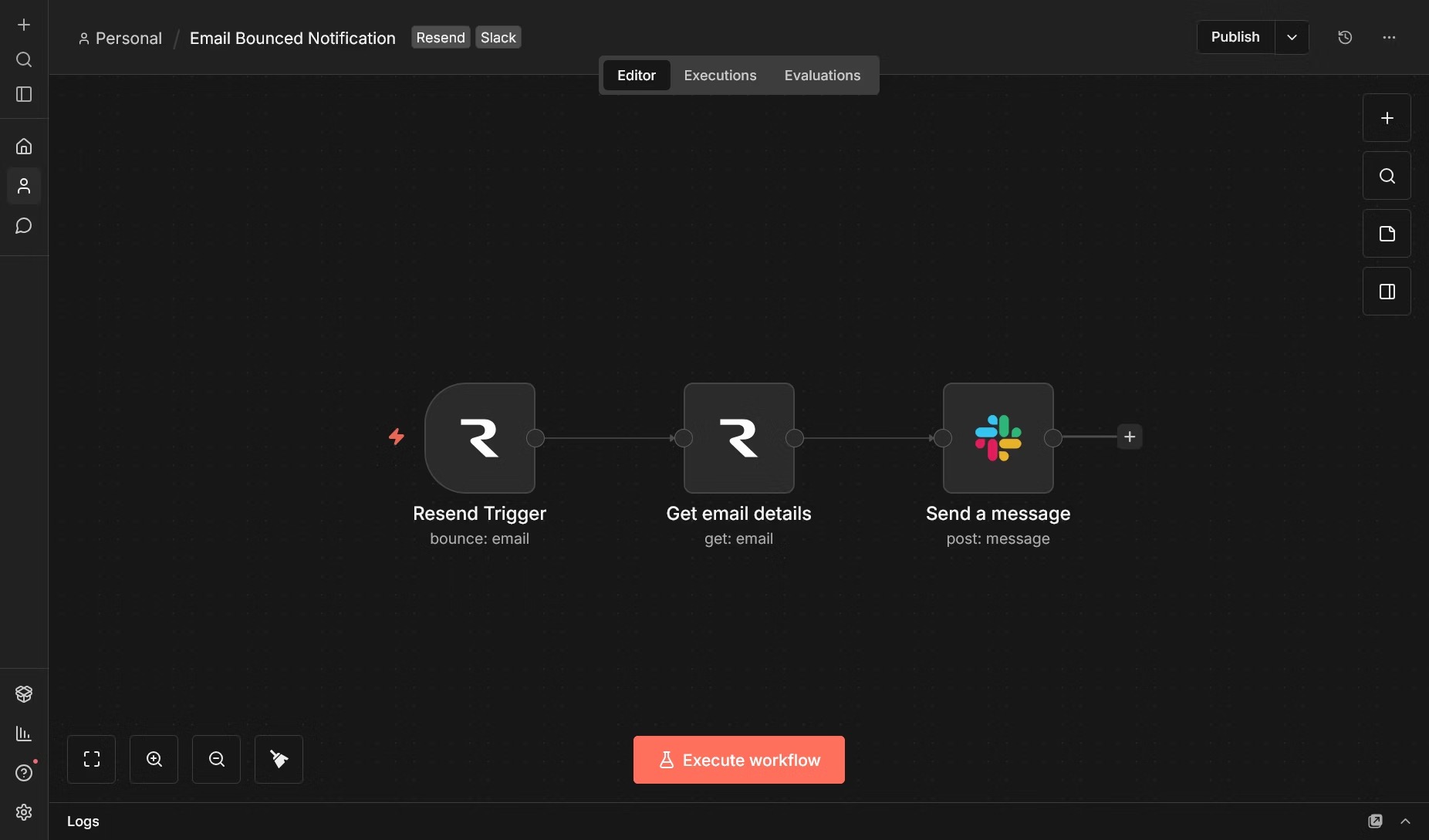 n8n has quietly become one of the most powerful workflow automation platforms available today. Whether you are syncing CRMs, building approval pipelines, or reacting to events in real time, n8n gives developers and teams the flexibility to automate almost anything without being locked into a single vendor.
## How It Started
When I first came across n8n, I was immediately drawn to how it modeled automation: nodes as composable building blocks, workflows as first-class objects, and a community that was clearly passionate about building for it.
**No Resend node existed at the time, so I built one.** I wanted something complete: a node you could reach for regardless of which Resend resource you were working with. Contacts, segments, broadcasts, templates, webhooks. Not just one that could send an email.
Over time, that community node grew into a full implementation covering all endpoints. With the help of Resend's team it was adopted officially, and it now lives in the [`resend/n8n-nodes-resend`](https://github.com/resend/n8n-nodes-resend) repository.
## Getting Started
Install the node directly from the n8n canvas
1. Make a new workflow
2. Open the nodes panel by selecting **+** or pressing **Tab**
3. Search for **Resend**
4. Select **Install** to install the node for your instance
5. The node is now available in all your workflows
Once installed, add [your API key](https://resend.com/api-keys) as a **Resend API** credential and you're ready to build.
### Send your first email
With the Resend node installed, it's time to send your first email. Open the nodes panel by selecting **+** or pressing **Tab**, search for **Resend**, and from the available actions select **Send a new email** and fill in the fields:
```
From: Acme
To: delivered@resend.dev
Subject: Hello from n8n
Body: It works!
```
Execute the node and you'll see the email delivered to your inbox.
To send from your own domain, [add and verify it](https://resend.com/docs/dashboard/domains/introduction) in the Resend dashboard, then update the **From** field with your verified address.
## Next Steps
If you want to get started or go deeper:
- **[Install the node](https://n8n.io/integrations/resend/)** from the n8n marketplace
- **[Read the docs](https://resend.com/docs/knowledge-base/n8n-integration)** on Resend's knowledge base
- **[Browse example workflows](https://github.com/resend/n8n-nodes-resend/tree/master/examples)** in the GitHub repo
- **[Report issues or contribute](https://github.com/resend/n8n-nodes-resend/issues)** — all feedback is welcome
If you build something with it, we'd love to hear about it.
n8n has quietly become one of the most powerful workflow automation platforms available today. Whether you are syncing CRMs, building approval pipelines, or reacting to events in real time, n8n gives developers and teams the flexibility to automate almost anything without being locked into a single vendor.
## How It Started
When I first came across n8n, I was immediately drawn to how it modeled automation: nodes as composable building blocks, workflows as first-class objects, and a community that was clearly passionate about building for it.
**No Resend node existed at the time, so I built one.** I wanted something complete: a node you could reach for regardless of which Resend resource you were working with. Contacts, segments, broadcasts, templates, webhooks. Not just one that could send an email.
Over time, that community node grew into a full implementation covering all endpoints. With the help of Resend's team it was adopted officially, and it now lives in the [`resend/n8n-nodes-resend`](https://github.com/resend/n8n-nodes-resend) repository.
## Getting Started
Install the node directly from the n8n canvas
1. Make a new workflow
2. Open the nodes panel by selecting **+** or pressing **Tab**
3. Search for **Resend**
4. Select **Install** to install the node for your instance
5. The node is now available in all your workflows
Once installed, add [your API key](https://resend.com/api-keys) as a **Resend API** credential and you're ready to build.
### Send your first email
With the Resend node installed, it's time to send your first email. Open the nodes panel by selecting **+** or pressing **Tab**, search for **Resend**, and from the available actions select **Send a new email** and fill in the fields:
```
From: Acme
To: delivered@resend.dev
Subject: Hello from n8n
Body: It works!
```
Execute the node and you'll see the email delivered to your inbox.
To send from your own domain, [add and verify it](https://resend.com/docs/dashboard/domains/introduction) in the Resend dashboard, then update the **From** field with your verified address.
## Next Steps
If you want to get started or go deeper:
- **[Install the node](https://n8n.io/integrations/resend/)** from the n8n marketplace
- **[Read the docs](https://resend.com/docs/knowledge-base/n8n-integration)** on Resend's knowledge base
- **[Browse example workflows](https://github.com/resend/n8n-nodes-resend/tree/master/examples)** in the GitHub repo
- **[Report issues or contribute](https://github.com/resend/n8n-nodes-resend/issues)** — all feedback is welcome
If you build something with it, we'd love to hear about it.