---
title: "Resend Forward 3: Wrap Up"
slug: resend-forward-3-wrap-up
description: "Everything we launched during the third launch week."
created_at: "2024-08-26"
updated_at: "2024-11-28"
image: https://cdn.resend.com/posts/resend-forward-3-wrap-up.jpg
humans: ["zeno-rocha"]
featured: false
category: "product"
---
Today marks the end of [Resend Forward](/forward), our third launch week.
In the last seven days, we shipped six new features.
Here's a quick recap of what we launched:
- [Day 1: Schedule Email API](#day-1-schedule-email-api)
- [Day 2: Vercel Integration](#day-2-vercel-integration)
- [Day 3: Marketing Analytics](#day-3-marketing-analytics)
- [Day 4: Deliverability Insights](#day-4-deliverability-insights)
- [Day 5: React Email 3.0](#day-5-react-email-30)
- [Day 6: Broadcast Schedule](#day-6-broadcast-schedule)
If you prefer watching instead of reading, check out this video:
## Day 1: Schedule email API
On Monday, we introduced a new API to schedule emails for a specific time.
```nodejs
import { Resend } from 'resend';
const resend = new Resend('re_xxxxxxxxx');
const oneMinuteFromNow = new Date(Date.now() + 1000 * 60).toISOString();
await resend.emails.send({
from: 'Acme ',
to: ['delivered@resend.dev'],
subject: 'hello world',
html: 'it works!
',
scheduledAt: oneMinuteFromNow,
});
```
```php
$resend = Resend::client('re_xxxxxxxxx');
$oneMinuteFromNow = (new DateTime())->modify('+1 minute')->format(DateTime::ISO8601);
$resend->emails->send([
'from' => 'Acme ',
'to' => ['delivered@resend.dev'],
'subject' => 'hello world',
'html' => 'it works!
',
'scheduled_at' => $oneMinuteFromNow
]);
```
```python
import resend
from datetime import datetime, timedelta
resend.api_key = "re_xxxxxxxxx"
one_minute_from_now = (datetime.now() + timedelta(minutes=1)).isoformat()
params: resend.Emails.SendParams = {
"from": "Acme ",
"to": ["delivered@resend.dev"],
"subject": "hello world",
"html": "it works!
",
"scheduled_at": one_minute_from_now
}
resend.Emails.send(params)
```
```ruby
require "resend"
Resend.api_key = "re_xxxxxxxxx"
one_minute_from_now = (Time.now + 1 * 60).strftime("%Y-%m-%dT%H:%M:%S.%L%z")
params = {
"from": "Acme ",
"to": ["delivered@resend.dev"],
"subject": "hello world",
"html": "it works!
",
"scheduled_at": one_minute_from_now
}
Resend::Emails.send(params)
```
```go
import (
"fmt"
"github.com/resend/resend-go/v2"
)
func main() {
ctx := context.TODO()
client := resend.NewClient("re_xxxxxxxxx")
oneMinuteFromNow := time.Now().Add(time.Minute * time.Duration(1))
oneMinuteFromNowISO := oneMinuteFromNow.Format("2006-01-02T15:04:05-0700")
params := &resend.SendEmailRequest{
From: "Acme ",
To: []string{"delivered@resend.dev"},
Subject: "hello world",
Html: "it works!
",
ScheduledAt: oneMinuteFromNowISO
}
sent, err := client.Emails.SendWithContext(ctx, params)
if err != nil {
panic(err)
}
fmt.Println(sent.Id)
}
```
```rust
use chrono::{Local, TimeDelta};
use resend_rs::types::CreateEmailBaseOptions;
use resend_rs::{Resend, Result};
#[tokio::main]
async fn main() -> Result<()> {
let resend = Resend::new("re_xxxxxxxxx");
let from = "Acme ";
let to = ["delivered@resend.dev"];
let subject = "hello world";
let one_minute_from_now = Local::now()
.checked_add_signed(TimeDelta::minutes(1))
.unwrap()
.to_rfc3339();
let email = CreateEmailBaseOptions::new(from, to, subject)
.with_html("it works!
")
.with_scheduled_at(&one_minute_from_now);
let _email = resend.emails.send(email).await?;
Ok(())
}
```
```java
import com.resend.*;
public class Main {
public static void main(String[] args) {
Resend resend = new Resend("re_xxxxxxxxx");
String oneMinuteFromNow = Instant
.now()
.plus(1, ChronoUnit.MINUTES)
.toString();
CreateEmailOptions params = CreateEmailOptions.builder()
.from("Acme ")
.to("delivered@resend.dev")
.subject("hello world")
.html("it works!
")
.scheduledAt(oneMinuteFromNow)
.build();
CreateEmailResponse data = resend.emails().send(params);
}
}
```
```dotnet
using Resend;
IResend resend = ResendClient.Create( "re_xxxxxxxxx" );
var resp = await resend.EmailSendAsync( new EmailMessage()
{
From = "Acme ",
To = "delivered@resend.dev",
Subject = "hello world",
HtmlBody = "it works!
",
MomentSchedule = DateTime.UtcNow.AddMinutes( 1 ),
} );
Console.WriteLine( "Email Id={0}", resp.Content );
```
```curl
curl -X POST 'https://api.resend.com/emails' \
-H 'Authorization: Bearer re_xxxxxxxxx' \
-H 'Content-Type: application/json' \
-d $'{
"from": "Acme ",
"to": ["delivered@resend.dev"],
"subject": "hello world",
"html": "it works!
",
"scheduled_at": "2024-08-20T11:52:01.858Z"
}'
```
Before, you had to use external services to handle the scheduling logic, but now you can use the new Resend API to schedule emails without having to introduce additional complexity.
## Day 2: Vercel Integration
On Tuesday, we announced a new integration with [Vercel](https://vercel.com/), designed to speed up the process of managing API keys and environment variables in your Vercel projects.
Now, you can integrate your Vercel projects directly within the Resend dashboard. This means that with just a few clicks, you can automatically create a new API key linked to the domain of your choice and have it instantly added as an environment variable in your Vercel project.
## Day 3: Marketing Analytics
On Wednesday, we launched a new view for marketing users. The goal is to understand how your emails deliver, who is engaging with them, and where users opt-out.
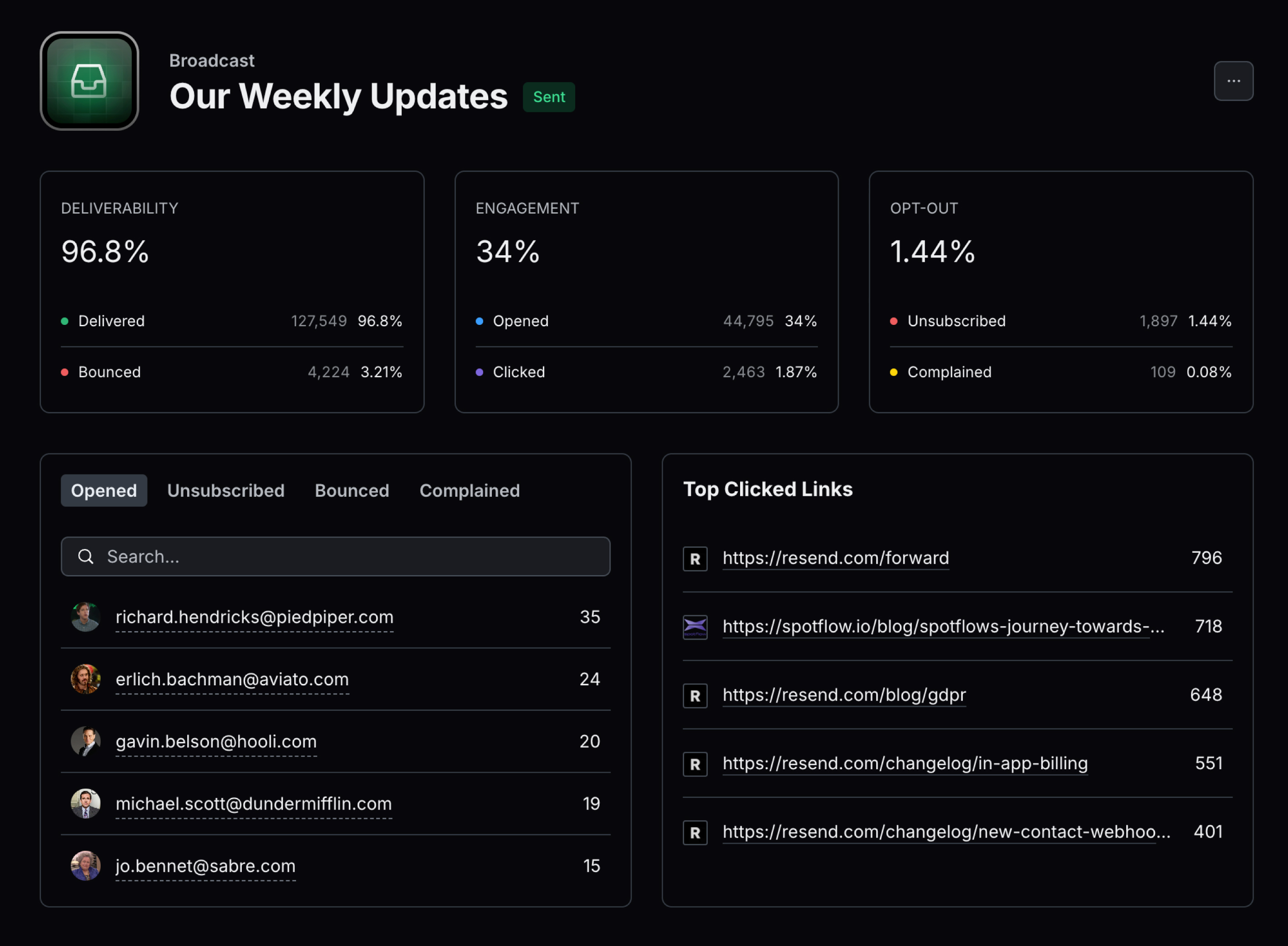 Earlier this year, we focused on creating the easiest way to write and send email blasts to your users.
But what happens _after_ you send an email? How do you know if your users liked it?
To help answer that question, we are unveiling Marketing Analytics, giving you both aggregated metrics along with itemized breakdowns of how your broadcasts performed.
## Day 4: Deliverability Insights
On Thursday, we released a new feature to improve your chances of landing in the inbox instead of the spam folder.
As we've helped companies of all sizes improve their deliverability, we realized a pattern in our advice. We often recommended the same best practices over and over. Knowing these best practices requires you to be an email expert or read different articles on deliverability, which can be overwhelming.
That's why we created Deliverability Insights.
## Day 5: React Email 3.0
On Friday, we announced a new major version of [react.email](https://react.email) with tons of bug fixes and a 11x performance improvement.
This version also includes **54 components** for you to create beautiful emails inspired by [Tailwind UI](https://tailwindui.com) and [shadcn/ui](https://ui.shadcn.com).
## Day 6: Broadcast Schedule
On the last day, we returned to the topic of scheduling emails, but this time, focused on broadcasts.
Now, you can use natural language to schedule emails to multiple contacts using broadcasts.
## Looking Forward
We hope you enjoyed the new features we launched last week.
See you in the next one.
Earlier this year, we focused on creating the easiest way to write and send email blasts to your users.
But what happens _after_ you send an email? How do you know if your users liked it?
To help answer that question, we are unveiling Marketing Analytics, giving you both aggregated metrics along with itemized breakdowns of how your broadcasts performed.
## Day 4: Deliverability Insights
On Thursday, we released a new feature to improve your chances of landing in the inbox instead of the spam folder.
As we've helped companies of all sizes improve their deliverability, we realized a pattern in our advice. We often recommended the same best practices over and over. Knowing these best practices requires you to be an email expert or read different articles on deliverability, which can be overwhelming.
That's why we created Deliverability Insights.
## Day 5: React Email 3.0
On Friday, we announced a new major version of [react.email](https://react.email) with tons of bug fixes and a 11x performance improvement.
This version also includes **54 components** for you to create beautiful emails inspired by [Tailwind UI](https://tailwindui.com) and [shadcn/ui](https://ui.shadcn.com).
## Day 6: Broadcast Schedule
On the last day, we returned to the topic of scheduling emails, but this time, focused on broadcasts.
Now, you can use natural language to schedule emails to multiple contacts using broadcasts.
## Looking Forward
We hope you enjoyed the new features we launched last week.
See you in the next one.