---
title: "React Email 6.0"
slug: react-email-6
description: "An open-source email editor you can embed in your own app, plus a new collection of templates."
created_at: "2026-04-17"
updated_at: "2026-04-17"
image: "https://cdn.resend.com/posts/react-email-VI-cover.jpg"
humans: ["danilo-woznica", "gabriel-miranda", "joao-melo", "zeh-fernandes"]
category: "product"
featured: true
---
We're excited to announce [React Email 6.0](https://react.email), featuring:
- **[Open-Source Editor](#open-source-editor)**
- **[Build your own Extensions](#build-your-own-extensions)**
- **[New Templates](#new-templates)**
- **[Unified Package](#unified-package)**
Get started today or check the [upgrade instructions](#get-started) below.
```bash
npm i react-email@latest @react-email/ui@latest
```
React Email now has **2M weekly downloads** on [npm](https://www.npmjs.com/package/react-email), that is a **108% increase** since the last major release 5 months ago.
We would like to thank all the **[196 open source contributors](https://github.com/resend/react-email/graphs/contributors)** who made this possible.
## Open-Source Editor
The centerpiece of React Email 6 is a **new open-source visual editor**, available as a standalone package.
```bash
npm i @react-email/editor
```
You can embed the editor directly in your app with a few lines of code.
```tsx
import { EmailEditor } from '@react-email/editor'
export default function MyEditor() {
return
}
```
The editor outputs semantically correct, email-ready HTML that renders correctly across every major inbox provider.
## Editor Architecture
Built on the fundamental learnings from React Email, the editor is designed to be easy to use, extensible, and flexible.
The editor is built in two layers.
1. **Core** works out of the box with no configuration.
2. **Extensions** custom features you can build using the composable API
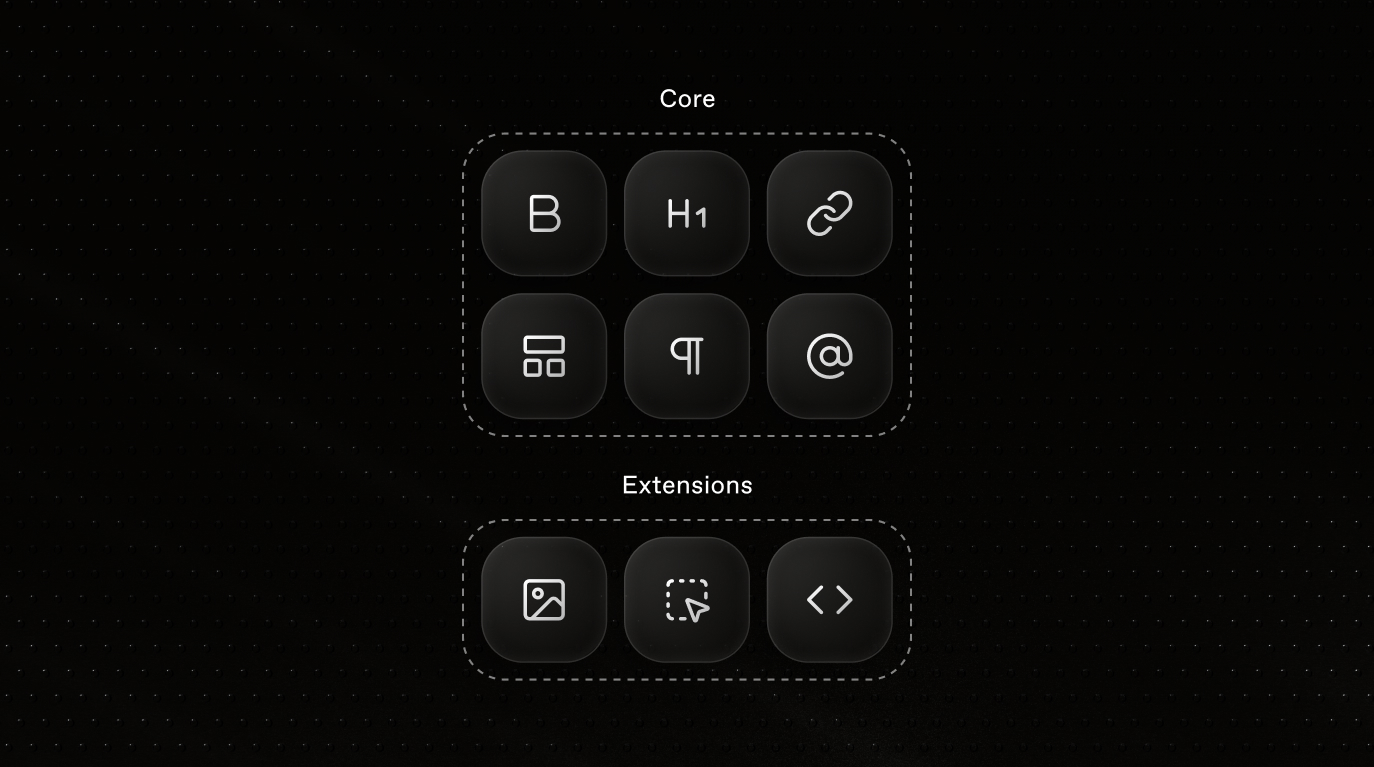 This architecture allows the core to remain simple and focused, while providing a composable API for building your own extensions.
To style the editor, import a default theme to get started quickly.
```tsx
import '@react-email/editor/themes/default.css'
```
You can also build your own theme to style the editor to look and feel like your own app.
## Build your own Extensions
The composable API exposes `EmailNode` so you can build any custom block your users need: uploading images to a CDN, embedding social posts, rendering charts inline in an email.
The opportunities are as endless as your imagination.
Each custom node defines both its HTML representation and its React Email output via `renderToReactEmail`.
```tsx
import { EmailNode } from '@react-email/editor/core';
import { mergeAttributes } from '@tiptap/core';
const Callout = EmailNode.create({
name: 'callout',
group: 'block',
content: 'inline*',
parseHTML() {
return [{ tag: 'div[data-callout]' }];
},
renderHTML({ HTMLAttributes }) {
return [
'div',
mergeAttributes(HTMLAttributes, { 'data-callout': '' }),
0,
];
},
renderToReactEmail({ children, style }) {
return (
This architecture allows the core to remain simple and focused, while providing a composable API for building your own extensions.
To style the editor, import a default theme to get started quickly.
```tsx
import '@react-email/editor/themes/default.css'
```
You can also build your own theme to style the editor to look and feel like your own app.
## Build your own Extensions
The composable API exposes `EmailNode` so you can build any custom block your users need: uploading images to a CDN, embedding social posts, rendering charts inline in an email.
The opportunities are as endless as your imagination.
Each custom node defines both its HTML representation and its React Email output via `renderToReactEmail`.
```tsx
import { EmailNode } from '@react-email/editor/core';
import { mergeAttributes } from '@tiptap/core';
const Callout = EmailNode.create({
name: 'callout',
group: 'block',
content: 'inline*',
parseHTML() {
return [{ tag: 'div[data-callout]' }];
},
renderHTML({ HTMLAttributes }) {
return [
'div',
mergeAttributes(HTMLAttributes, { 'data-callout': '' }),
0,
];
},
renderToReactEmail({ children, style }) {
return (
{children}
);
},
});
```
For more help, view [editor examples](https://react.email/editor/examples) or read the [full editor documentation](https://react.email/docs/editor/overview).
## New Templates
React Email 6 also ships with a new collection of templates created by our friends at [Character Studio](https://character.studio) for common use cases, including authentication flows and e-commerce sequences.
Use them as a starting point, or pull individual sections into your own templates. The templates are available as [React Email templates](https://demo.react.email) or as Figma files ([Authentication templates](https://www.figma.com/community/file/1626682167713928769), [E-commerce templates](https://www.figma.com/community/file/1626680546446620209)).
## Unified Package
To simplify the development experience, we've unified all React Email components into a single package. This means you can now import everything you need from `react-email` without worrying about multiple packages.
```tsx
import { Button, Container, Html, Heading, Tailwind } from 'react-email'
```
This does not include the Editor, which needs to be installed separately.
We've also moved what was `@react-email/preview-server` into what's now `@react-email/ui`.
## Upgrade instructions
Here's how to update from React Email 5.0 to 6.0.
**A) Remove the old packages:**
```bash
npm rm @react-email/components @react-email/preview-server
```
**B) Install the new packages:**
```bash
npm i react-email@latest @react-email/ui@latest
```
**C) Update your imports:**
Instead of importing from `@react-email/components`:
```tsx
import { Button, Html, Head, render } from "@react-email/components";
```
You can now import from `react-email`:
```tsx
import { Button, Html, Head, render } from "react-email";
```
For a thorough explanation, see the [updating guide](https://react.email/docs/getting-started/updating-react-email#update-from-react-email-5-0-to-6-0).
## Conclusion
We're excited to see the new possibilities that the open-source editor and the new templates will bring to the community.
If you have any questions, feel free to reach out to us on [GitHub](https://github.com/resend/react-email).