---
title: "Top 10 new features in 2024"
slug: new-features-in-2024
description: "A recap of some of the best features we launched this year."
created_at: "2024-12-31"
updated_at: "2025-02-11"
image: https://cdn.resend.com/posts/new-features-in-2024.jpg
humans: ["zeno-rocha"]
category: "product"
---
Today marks the end of 2024. Before launching into 2025, let's recap some of the best features we launched this year.
Here's a quick overview:
1. [Broadcasts](#1-broadcasts)
2. [React Email 3.0](#2-react-email-30)
3. [Audiences](#3-audiences)
4. [Batch API](#4-batch-api)
5. [New SDKs](#5-new-sdks)
6. [Email Scheduling](#6-email-scheduling)
7. [Marketing Analytics](#7-marketing-analytics)
8. [Deliverability Insights](#8-deliverability-insights)
9. [New webhooks](#9-new-webhooks)
10. [Platform Integrations](#10-platform-integrations)
## 1. Broadcasts
In January, we expanded Resend from being an email API only to a no-code tool for technical and non-technical team members to engage with their audience.
Broadcasts let you send email blasts using our WYSIWYG editor. It comes with email testing, markdown support, performance tracking, and 1,000 contacts for free.
We continued improving the editor, like our **new style editor**.
Additionally, we released **four new components**: [Section](/changelog/new-section-component), [Code Block](/changelog/new-code-block-component), [YouTube](/changelog/new-youtube-component), and [𝕏 (formerly Twitter)](/changelog/new-x-twitter-component).
## 2. React Email 3.0
This year, we launched **two major versions** of our open-source project [React Email](https://react.email), which included numerous bug fixes, new features and components, and a 40x performance improvement.
Version 3.0, the latest version, included **54 components**, along with several big performance improvements and new integrations.
## 3. Audiences
In January, we announced a new way to manage recipients.
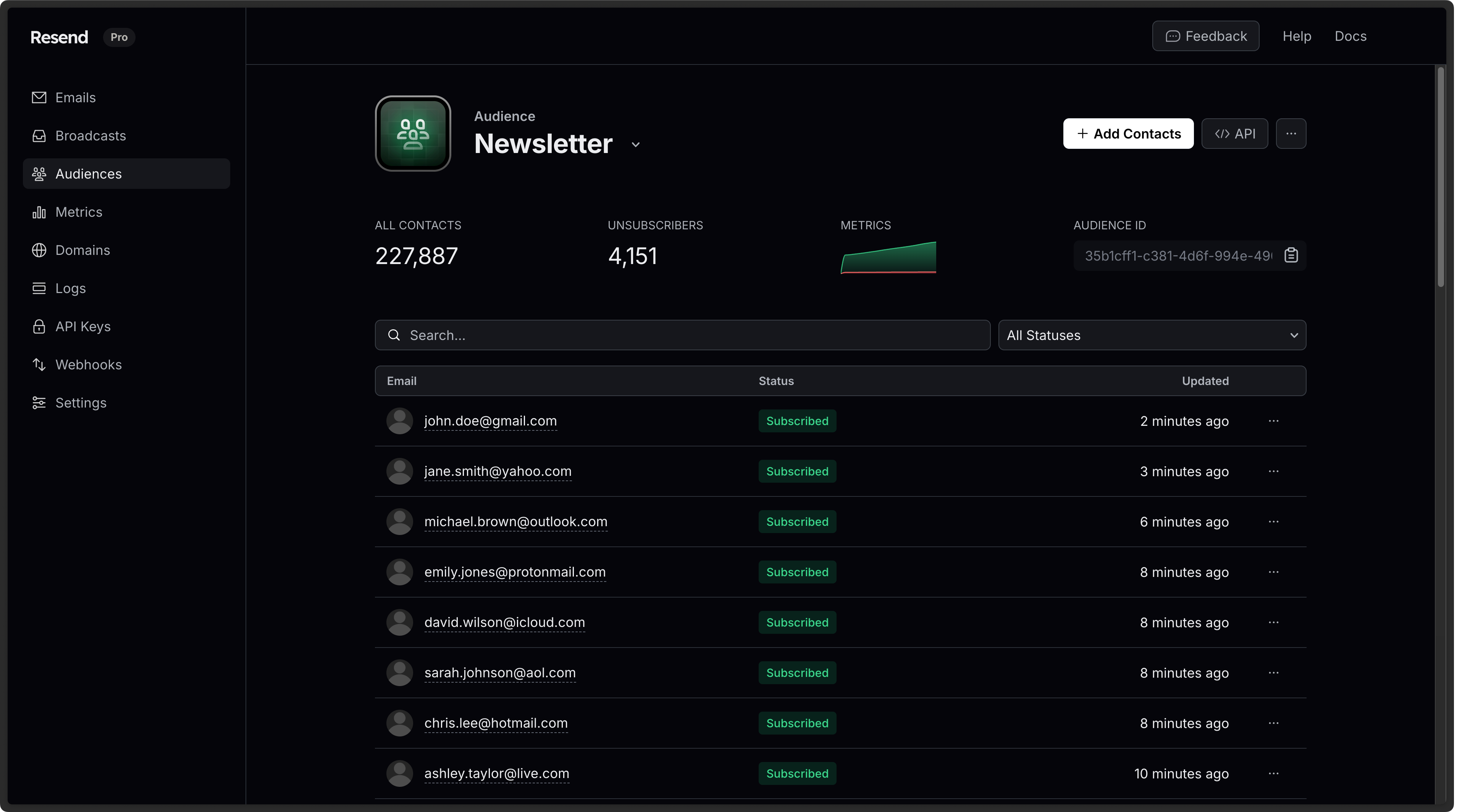 Audiences let you add, update, retrieve, and remove contacts without having to worry about the entire unsubscribe flow. The new feature comes with [9 new API endpoints](https://resend.com/docs/api-reference/audiences/create-audience). We also introduced a CSV wizard for easily importing contacts.
## 4. Batch API
This year, we released a new batch API to send up to 100 emails in one request.
Audiences let you add, update, retrieve, and remove contacts without having to worry about the entire unsubscribe flow. The new feature comes with [9 new API endpoints](https://resend.com/docs/api-reference/audiences/create-audience). We also introduced a CSV wizard for easily importing contacts.
## 4. Batch API
This year, we released a new batch API to send up to 100 emails in one request.
 The Batch API has full SDK support, including: [Python](https://github.com/resend/resend-python), [Ruby](https://github.com/resend/resend-ruby), [PHP](https://github.com/resend/resend-php), [Go](https://github.com/resend/resend-go), and [Java](https://github.com/resend/resend-java).
## 5. New SDK
Rust has seen a rapid rise in popularity in the last few years, and one of the driving forces behind it has been the attention paid to type safety and developer ergonomics.
With those values in mind, this year we released our new [Rust SDK](https://github.com/resend/resend-rust). The new SDK joins a [dozen other SDKs](https://resend.com/docs/sdks) available for other languages, including Python, Ruby, PHP, Go, and Java.
## 6. Email Scheduling
We introduced two ways to schedule emails: [transactional](#transactional-schedule-api) and [broadcasts](#broadcast-scheduling).
### Transactional Schedule API
We introduced a new API to schedule transactional emails for a specific time.
```nodejs
import { Resend } from 'resend';
const resend = new Resend('re_xxxxxxxxx');
const oneMinuteFromNow = new Date(Date.now() + 1000 * 60).toISOString();
await resend.emails.send({
from: 'Acme ',
to: ['delivered@resend.dev'],
subject: 'hello world',
html: '
The Batch API has full SDK support, including: [Python](https://github.com/resend/resend-python), [Ruby](https://github.com/resend/resend-ruby), [PHP](https://github.com/resend/resend-php), [Go](https://github.com/resend/resend-go), and [Java](https://github.com/resend/resend-java).
## 5. New SDK
Rust has seen a rapid rise in popularity in the last few years, and one of the driving forces behind it has been the attention paid to type safety and developer ergonomics.
With those values in mind, this year we released our new [Rust SDK](https://github.com/resend/resend-rust). The new SDK joins a [dozen other SDKs](https://resend.com/docs/sdks) available for other languages, including Python, Ruby, PHP, Go, and Java.
## 6. Email Scheduling
We introduced two ways to schedule emails: [transactional](#transactional-schedule-api) and [broadcasts](#broadcast-scheduling).
### Transactional Schedule API
We introduced a new API to schedule transactional emails for a specific time.
```nodejs
import { Resend } from 'resend';
const resend = new Resend('re_xxxxxxxxx');
const oneMinuteFromNow = new Date(Date.now() + 1000 * 60).toISOString();
await resend.emails.send({
from: 'Acme ',
to: ['delivered@resend.dev'],
subject: 'hello world',
html: 'it works!
',
scheduledAt: oneMinuteFromNow,
});
```
```ruby
require "resend"
Resend.api_key = "re_xxxxxxxxx"
one_minute_from_now = (Time.now + 1 * 60).strftime("%Y-%m-%dT%H:%M:%S.%L%z")
params = {
"from": "Acme ",
"to": ["delivered@resend.dev"],
"subject": "hello world",
"html": "it works!
",
"scheduled_at": one_minute_from_now
}
Resend::Emails.send(params)
```
```php
$resend = Resend::client('re_xxxxxxxxx');
$oneMinuteFromNow = (new DateTime())->modify('+1 minute')->format(DateTime::ISO8601);
$resend->emails->send([
'from' => 'Acme ',
'to' => ['delivered@resend.dev'],
'subject' => 'hello world',
'html' => 'it works!
',
'scheduled_at' => $oneMinuteFromNow
]);
```
```python
import resend
from datetime import datetime, timedelta
resend.api_key = "re_xxxxxxxxx"
one_minute_from_now = (datetime.now() + timedelta(minutes=1)).isoformat()
params: resend.Emails.SendParams = {
"from": "Acme ",
"to": ["delivered@resend.dev"],
"subject": "hello world",
"html": "it works!
",
"scheduled_at": one_minute_from_now
}
resend.Emails.send(params)
```
```go
import (
"fmt"
"github.com/resend/resend-go/v2"
)
func main() {
ctx := context.TODO()
client := resend.NewClient("re_xxxxxxxxx")
oneMinuteFromNow := time.Now().Add(time.Minute * time.Duration(1))
oneMinuteFromNowISO := oneMinuteFromNow.Format("2006-01-02T15:04:05-0700")
params := &resend.SendEmailRequest{
From: "Acme ",
To: []string{"delivered@resend.dev"},
Subject: "hello world",
Html: "it works!
",
ScheduledAt: oneMinuteFromNowISO
}
sent, err := client.Emails.SendWithContext(ctx, params)
if err != nil {
panic(err)
}
fmt.Println(sent.Id)
}
```
```rust
use chrono::{Local, TimeDelta};
use resend_rs::types::CreateEmailBaseOptions;
use resend_rs::{Resend, Result};
#[tokio::main]
async fn main() -> Result<()> {
let resend = Resend::new("re_xxxxxxxxx");
let from = "Acme ";
let to = ["delivered@resend.dev"];
let subject = "hello world";
let one_minute_from_now = Local::now()
.checked_add_signed(TimeDelta::minutes(1))
.unwrap()
.to_rfc3339();
let email = CreateEmailBaseOptions::new(from, to, subject)
.with_html("it works!
")
.with_scheduled_at(&one_minute_from_now);
let _email = resend.emails.send(email).await?;
Ok(())
}
```
```java
import com.resend.*;
public class Main {
public static void main(String[] args) {
Resend resend = new Resend("re_xxxxxxxxx");
String oneMinuteFromNow = Instant
.now()
.plus(1, ChronoUnit.MINUTES)
.toString();
CreateEmailOptions params = CreateEmailOptions.builder()
.from("Acme ")
.to("delivered@resend.dev")
.subject("hello world")
.html("it works!
")
.scheduledAt(oneMinuteFromNow)
.build();
CreateEmailResponse data = resend.emails().send(params);
}
}
```
```dotnet
using Resend;
IResend resend = ResendClient.Create( "re_xxxxxxxxx" );
var resp = await resend.EmailSendAsync( new EmailMessage()
{
From = "Acme ",
To = "delivered@resend.dev",
Subject = "hello world",
HtmlBody = "it works!
",
MomentSchedule = DateTime.UtcNow.AddMinutes( 1 ),
} );
Console.WriteLine( "Email Id={0}", resp.Content );
```
```curl
curl -X POST 'https://api.resend.com/emails' \
-H 'Authorization: Bearer re_xxxxxxxxx' \
-H 'Content-Type: application/json' \
-d $'{
"from": "Acme ",
"to": ["delivered@resend.dev"],
"subject": "hello world",
"html": "it works!
",
"scheduled_at": "2024-08-20T11:52:01.858Z"
}'
```
Later in the year, we also added [natural language scheduling](/changelog/schedule-api-with-natural-language) to the API.
### Broadcast Scheduling
Using broadcasts, you can use natural language to schedule emails to multiple contacts.
## 7. Marketing Analytics
To help marketing users understand deliverability, engagement, and when users opt-out, we released Marketing Analytics.
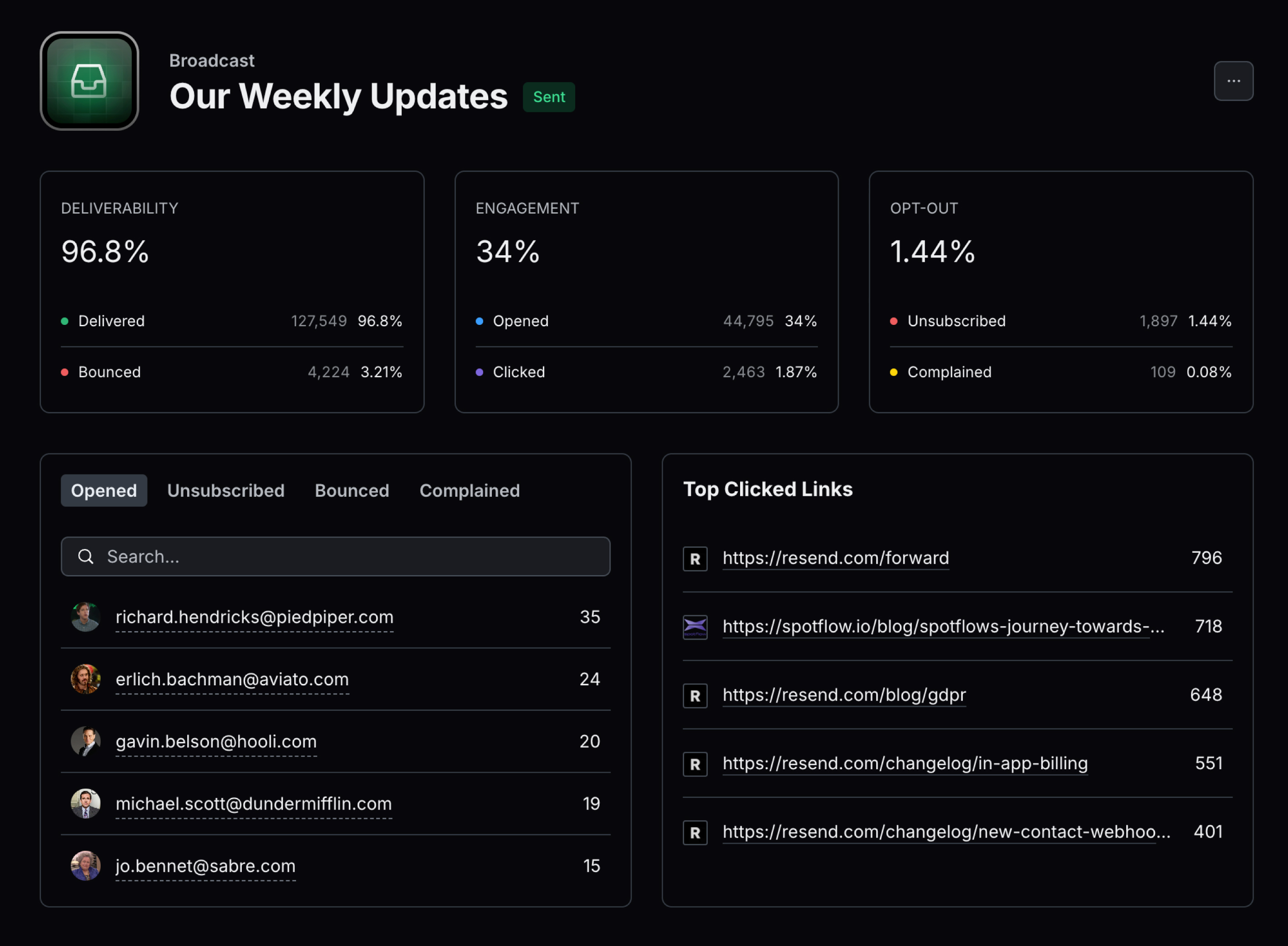 Marketing Analytics provides aggregated metrics and itemized breakdowns of how your broadcasts performed.
## 8. Deliverability Insights
We often recommend the same best practices to our users and compiled these findings into Deliverability Insights, a new feature that provides best practices for email deliverability.
## 9. New Webhooks
We introduced several new webhooks to provide more control and insight into events.
### Domain Webhooks
Domains are critical to email deliverability. Some companies allow their users to configure emails in their own apps using custom domains, which is essential for deliverability, white-labeling, and branding purposes.
We added real-time notifications when domains are created, updated, or deleted to assist these users.
### Contact Webhooks
You can receive real-time notifications when contacts are created, updated, or deleted. These webhooks are helpful for sending welcome emails, storing contact updates, creating Slack alerts, syncing contacts with your CRM, and more.
## 10. Platform Integrations
This year, we introduced several new platform integrations, including [Vercel](#vercel-integration) and [Zapier](#zapier-integration).
### Vercel Integration
We announced a new integration with [Vercel](https://vercel.com/), designed to speed up managing API keys and environment variables in your Vercel projects.
Now, you can integrate your Vercel projects directly within the Resend dashboard. With just a few clicks, create a new API key linked to the domain of your choice and have it instantly added as an environment variable in your Vercel project.
### Zapier Integration
We launched a [new Zapier integration](https://zapier.com/apps/resend/integrations) that allows you to connect Resend with over 6,000+ apps.

## Looking Forward
We hope you enjoyed the new features we launched this year.
See you in the next one.
Marketing Analytics provides aggregated metrics and itemized breakdowns of how your broadcasts performed.
## 8. Deliverability Insights
We often recommend the same best practices to our users and compiled these findings into Deliverability Insights, a new feature that provides best practices for email deliverability.
## 9. New Webhooks
We introduced several new webhooks to provide more control and insight into events.
### Domain Webhooks
Domains are critical to email deliverability. Some companies allow their users to configure emails in their own apps using custom domains, which is essential for deliverability, white-labeling, and branding purposes.
We added real-time notifications when domains are created, updated, or deleted to assist these users.
### Contact Webhooks
You can receive real-time notifications when contacts are created, updated, or deleted. These webhooks are helpful for sending welcome emails, storing contact updates, creating Slack alerts, syncing contacts with your CRM, and more.
## 10. Platform Integrations
This year, we introduced several new platform integrations, including [Vercel](#vercel-integration) and [Zapier](#zapier-integration).
### Vercel Integration
We announced a new integration with [Vercel](https://vercel.com/), designed to speed up managing API keys and environment variables in your Vercel projects.
Now, you can integrate your Vercel projects directly within the Resend dashboard. With just a few clicks, create a new API key linked to the domain of your choice and have it instantly added as an environment variable in your Vercel project.
### Zapier Integration
We launched a [new Zapier integration](https://zapier.com/apps/resend/integrations) that allows you to connect Resend with over 6,000+ apps.

## Looking Forward
We hope you enjoyed the new features we launched this year.
See you in the next one.