---
title: "Manage subscribers with Resend Audiences"
slug: manage-subscribers-using-resend-audiences
description: "Add, update, retrieve, and remove contacts without having to worry about the entire unsubscribe flow."
created_at: "2024-01-16"
updated_at: "2025-02-06"
image: https://cdn.resend.com/posts/manage-subscribers-using-resend-audiences.jpg
humans: ["bu-kinoshita"]
category: "product"
---
Managing subscribers and unsubscribers is a critical part of any email implementation. It's important to respect your users' preferences and ensure that they're receiving the right emails at the right time.
Today, we're excited to announce the launch of [Resend Audiences](https://resend.com/audiences), a new feature that allows you to manage your contacts in a simple and intuitive way.
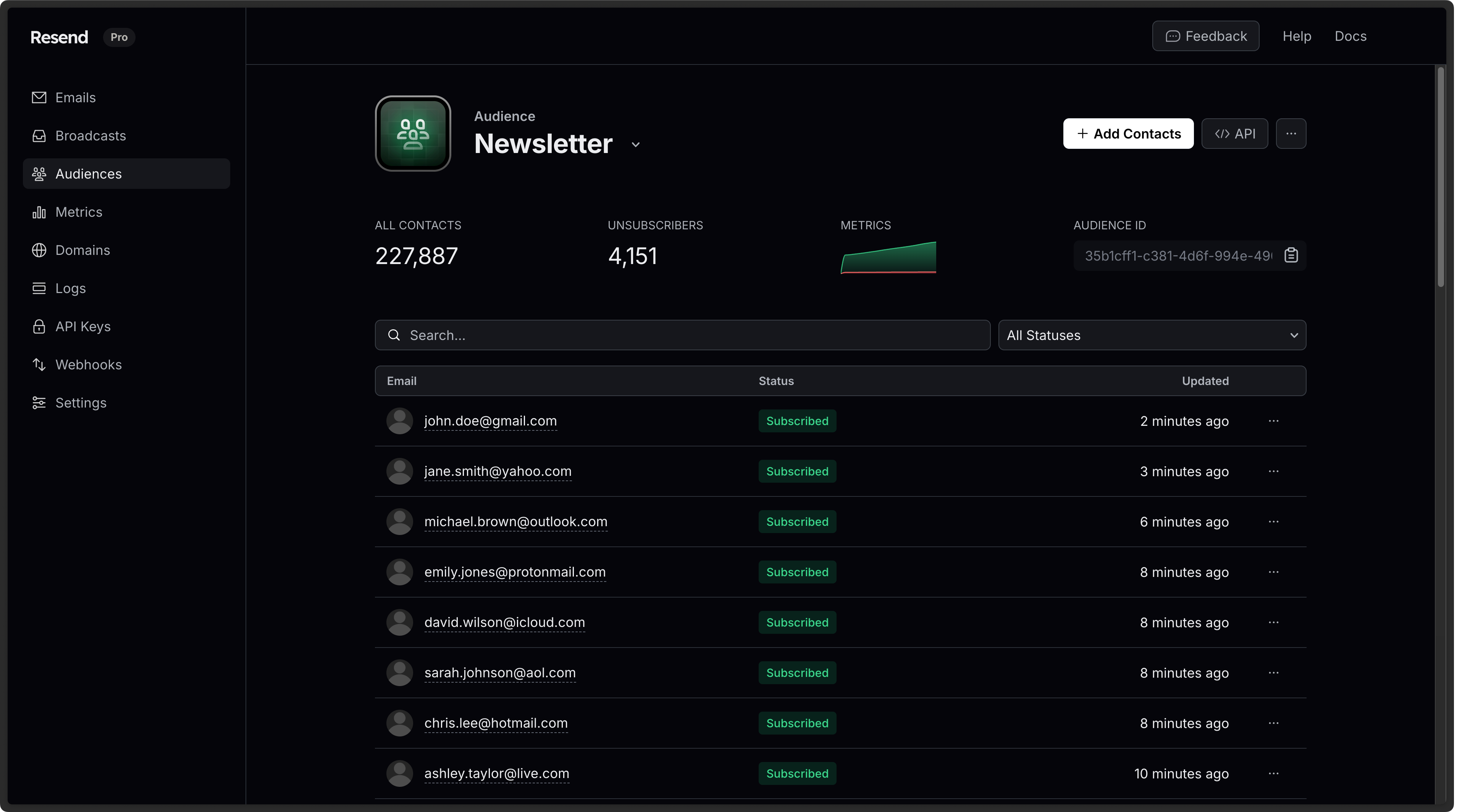 These new capabilities include 9 new endpoints to the [Resend API](https://resend.com/docs/api-reference/audiences/create-audience), which you can use to control audiences and contacts programmatically.

## Import Contacts
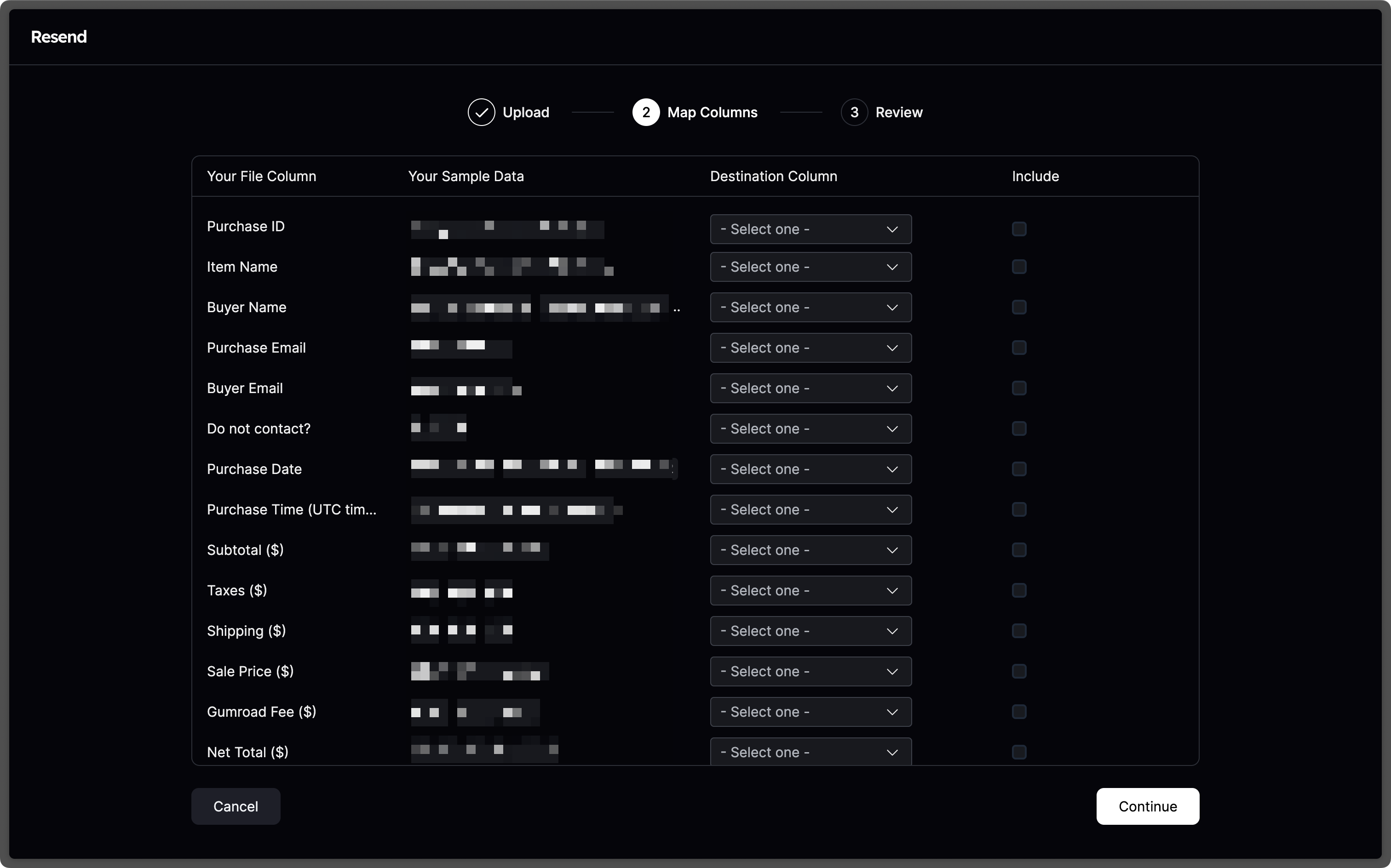
To get started, you can add contacts manually or import them via CSV.
After you upload your CSV file, you'll be able to map the fields you want to use.
Currently, the supported fields are `email`, `first_name`, `last_name`, and `unsubscribed`.
These new capabilities include 9 new endpoints to the [Resend API](https://resend.com/docs/api-reference/audiences/create-audience), which you can use to control audiences and contacts programmatically.

## Import Contacts
To get started, you can add contacts manually or import them via CSV.
After you upload your CSV file, you'll be able to map the fields you want to use.
Currently, the supported fields are `email`, `first_name`, `last_name`, and `unsubscribed`.
 ## Add Contacts Programmatically
Instead of manually importing contacts, you can also add them programmatically.
You can leverage one of the Resend SDKs to add contacts to your audience.
```nodejs
import { Resend } from 'resend';
const resend = new Resend('re_xxxxxxxxx');
resend.contacts.create({
email: 'steve.wozniak@gmail.com',
firstName: 'Steve',
lastName: 'Wozniak',
unsubscribed: false,
audienceId: '78261eea-8f8b-4381-83c6-79fa7120f1cf',
});
```
```ruby
require "resend"
Resend.api_key = "re_xxxxxxxxx"
params = {
"email": "steve.wozniak@gmail.com",
"first_name": "Steve",
"last_name": "Wozniak",
"unsubscribed": false,
"audience_id": "78261eea-8f8b-4381-83c6-79fa7120f1cf",
}
Resend::Contacts.create(params)
```
```php
$resend = Resend::client('re_xxxxxxxxx');
$resend->contacts->create(
audienceId: '78261eea-8f8b-4381-83c6-79fa7120f1cf',
parameters: [
'email' => 'steve.wozniak@gmail.com',
'first_name' => 'Steve',
'last_name' => 'Wozniak',
'unsubscribed' => false
]
);
```
```python
import resend
resend.api_key = "re_xxxxxxxxx"
params: resend.Contacts.CreateParams = {
"email": "steve.wozniak@gmail.com",
"first_name": "Steve",
"last_name": "Wozniak",
"unsubscribed": False,
"audience_id": "78261eea-8f8b-4381-83c6-79fa7120f1cf",
}
resend.Contacts.create(params)
```
```go
import "github.com/resend/resend-go/v2"
client := resend.NewClient("re_xxxxxxxxx")
params := &resend.CreateContactRequest{
Email: "steve.wozniak@gmail.com",
FirstName: "Steve",
LastName: "Wozniak",
Unsubscribed: false,
AudienceId: "78261eea-8f8b-4381-83c6-79fa7120f1cf",
}
contact, err := client.Contacts.Create(params)
```
```rust
use resend_rs::{types::ContactData, Resend, Result};
#[tokio::main]
async fn main() -> Result<()> {
let resend = Resend::new("re_xxxxxxxxx");
let contact = ContactData::new("steve.wozniak@gmail.com")
.with_first_name("Steve")
.with_last_name("Wozniak")
.with_unsubscribed(false);
let _contact = resend
.contacts
.create("78261eea-8f8b-4381-83c6-79fa7120f1cf", contact)
.await?;
Ok(())
}
```
```java
import com.resend.*;
public class Main {
public static void main(String[] args) {
Resend resend = new Resend("re_xxxxxxxxx");
CreateContactOptions params = CreateContactOptions.builder()
.email("steve.wozniak@gmail.com")
.firstName("Steve")
.lastName("Wozniak")
.unsubscribed(true)
.audienceId("78261eea-8f8b-4381-83c6-79fa7120f1cf")
.build();
CreateContactResponseSuccess data = resend.contacts().create(params);
}
}
```
```dotnet
using Resend;
IResend resend = ResendClient.Create( "re_xxxxxxxxx" );
var resp = await resend.ContactAddAsync(
new Guid( "78261eea-8f8b-4381-83c6-79fa7120f1cf" ),
new ContactData()
{
Email = "steve.wozniak@gmail.com",
FirstName = "Steve",
LastName = "Wozniak",
IsUnsubscribed = false,
}
);
Console.WriteLine( "Contact Id={0}", resp.Content );
```
```curl
curl -X POST 'https://api.resend.com/audiences/78261eea-8f8b-4381-83c6-79fa7120f1cf/contacts' \\
-H 'Authorization: Bearer re_xxxxxxxxx' \\
-H 'Content-Type: application/json' \\
-d $'{
"email": "steve.wozniak@gmail.com",
"first_name": "Steve",
"last_name": "Wozniak",
"unsubscribed": false
}'
```
## Send emails to your Audience
Audiences were designed to be used in conjunction with [Broadcasts](https://resend.com/broadcasts).
You can send emails to your Audience by creating a new Broadcast and selecting the Audience you want to send it to.

You can include the Unsubscribe Footer in your Broadcasts, which will be automatically replaced with the correct link for each contact.

## Automatic Unsubscribes
When you send emails to your Audience, Resend will automatically handle the unsubscribe flow for you.
If a contact unsubscribes from your emails, they will be skipped when sending a Broadcast.

We also include the proper unsubscribe headers automatically, according to [Gmail and Yahoo's bulk sending requirements for 2024](/blog/gmail-and-yahoo-bulk-sending-requirements-for-2024).
```sh
List-Unsubscribe:
List-Unsubscribe-Post: List-Unsubscribe=One-Click
```
## Get Started
Go to [Audiences](https://resend.com/audiences) and start adding contacts today.
You can get started with 1,000 contacts for free.
Once you're ready to upgrade, you can get a paid plan starting at $40/mo for 5,000 contacts. See [Pricing](https://resend.com/pricing) for all the different tiers.
## Add Contacts Programmatically
Instead of manually importing contacts, you can also add them programmatically.
You can leverage one of the Resend SDKs to add contacts to your audience.
```nodejs
import { Resend } from 'resend';
const resend = new Resend('re_xxxxxxxxx');
resend.contacts.create({
email: 'steve.wozniak@gmail.com',
firstName: 'Steve',
lastName: 'Wozniak',
unsubscribed: false,
audienceId: '78261eea-8f8b-4381-83c6-79fa7120f1cf',
});
```
```ruby
require "resend"
Resend.api_key = "re_xxxxxxxxx"
params = {
"email": "steve.wozniak@gmail.com",
"first_name": "Steve",
"last_name": "Wozniak",
"unsubscribed": false,
"audience_id": "78261eea-8f8b-4381-83c6-79fa7120f1cf",
}
Resend::Contacts.create(params)
```
```php
$resend = Resend::client('re_xxxxxxxxx');
$resend->contacts->create(
audienceId: '78261eea-8f8b-4381-83c6-79fa7120f1cf',
parameters: [
'email' => 'steve.wozniak@gmail.com',
'first_name' => 'Steve',
'last_name' => 'Wozniak',
'unsubscribed' => false
]
);
```
```python
import resend
resend.api_key = "re_xxxxxxxxx"
params: resend.Contacts.CreateParams = {
"email": "steve.wozniak@gmail.com",
"first_name": "Steve",
"last_name": "Wozniak",
"unsubscribed": False,
"audience_id": "78261eea-8f8b-4381-83c6-79fa7120f1cf",
}
resend.Contacts.create(params)
```
```go
import "github.com/resend/resend-go/v2"
client := resend.NewClient("re_xxxxxxxxx")
params := &resend.CreateContactRequest{
Email: "steve.wozniak@gmail.com",
FirstName: "Steve",
LastName: "Wozniak",
Unsubscribed: false,
AudienceId: "78261eea-8f8b-4381-83c6-79fa7120f1cf",
}
contact, err := client.Contacts.Create(params)
```
```rust
use resend_rs::{types::ContactData, Resend, Result};
#[tokio::main]
async fn main() -> Result<()> {
let resend = Resend::new("re_xxxxxxxxx");
let contact = ContactData::new("steve.wozniak@gmail.com")
.with_first_name("Steve")
.with_last_name("Wozniak")
.with_unsubscribed(false);
let _contact = resend
.contacts
.create("78261eea-8f8b-4381-83c6-79fa7120f1cf", contact)
.await?;
Ok(())
}
```
```java
import com.resend.*;
public class Main {
public static void main(String[] args) {
Resend resend = new Resend("re_xxxxxxxxx");
CreateContactOptions params = CreateContactOptions.builder()
.email("steve.wozniak@gmail.com")
.firstName("Steve")
.lastName("Wozniak")
.unsubscribed(true)
.audienceId("78261eea-8f8b-4381-83c6-79fa7120f1cf")
.build();
CreateContactResponseSuccess data = resend.contacts().create(params);
}
}
```
```dotnet
using Resend;
IResend resend = ResendClient.Create( "re_xxxxxxxxx" );
var resp = await resend.ContactAddAsync(
new Guid( "78261eea-8f8b-4381-83c6-79fa7120f1cf" ),
new ContactData()
{
Email = "steve.wozniak@gmail.com",
FirstName = "Steve",
LastName = "Wozniak",
IsUnsubscribed = false,
}
);
Console.WriteLine( "Contact Id={0}", resp.Content );
```
```curl
curl -X POST 'https://api.resend.com/audiences/78261eea-8f8b-4381-83c6-79fa7120f1cf/contacts' \\
-H 'Authorization: Bearer re_xxxxxxxxx' \\
-H 'Content-Type: application/json' \\
-d $'{
"email": "steve.wozniak@gmail.com",
"first_name": "Steve",
"last_name": "Wozniak",
"unsubscribed": false
}'
```
## Send emails to your Audience
Audiences were designed to be used in conjunction with [Broadcasts](https://resend.com/broadcasts).
You can send emails to your Audience by creating a new Broadcast and selecting the Audience you want to send it to.

You can include the Unsubscribe Footer in your Broadcasts, which will be automatically replaced with the correct link for each contact.

## Automatic Unsubscribes
When you send emails to your Audience, Resend will automatically handle the unsubscribe flow for you.
If a contact unsubscribes from your emails, they will be skipped when sending a Broadcast.

We also include the proper unsubscribe headers automatically, according to [Gmail and Yahoo's bulk sending requirements for 2024](/blog/gmail-and-yahoo-bulk-sending-requirements-for-2024).
```sh
List-Unsubscribe:
List-Unsubscribe-Post: List-Unsubscribe=One-Click
```
## Get Started
Go to [Audiences](https://resend.com/audiences) and start adding contacts today.
You can get started with 1,000 contacts for free.
Once you're ready to upgrade, you can get a paid plan starting at $40/mo for 5,000 contacts. See [Pricing](https://resend.com/pricing) for all the different tiers.