---
title: "Introducing Email Skills"
slug: introducing-email-skills
description: "Empower your AI Agents to create, send, and manage emails."
created_at: "2026-01-28"
updated_at: "2026-01-28"
image: https://cdn.resend.com/posts/introducing-email-skills.jpg
humans: ["chris-pennington"]
featured: true
category: "product"
---
AI agents are becoming a core part of how developers build software. They write code, debug issues, and ship features alongside us. To get the most of out agents, you need to **provide the agent with expertise**.
[Agent skills](https://agentskills.io/home) are a new open standard for **providing expertise to agents without bloating the context window**. Created by Anthropic, skills are now available in all major AI development tools, including [Claude Code](https://code.claude.com/docs/en/skills), [Open AI Codex](https://developers.openai.com/codex/skills/), [Cursor](https://cursor.com/docs/context/skills), [Google Gemini](https://geminicli.com/docs/cli/skills/), [OpenCode](https://opencode.ai/docs/skills/), [VSCode](https://code.visualstudio.com/docs/copilot/customization/agent-skills), and more.
We're releasing three Agent Skills:
1. [**Email Best Practices**](#1-email-best-practices-skill)
2. [**React Email**](#2-react-email-skill)
3. [**Resend Skill**](#3-resend-skill)
These skills give AI agents the context they need to help you build production-ready email systems.
For a quick overview, watch the video below:
## What are Agent Skills?
Agent Skills are modular capabilities that extend what an agent can do, while preserving the context window. Each skill packages instructions, metadata, and optional resources that an agent can use when relevant.
At its simplest, a skill is a directory containing a `SKILL.md` file with YAML fields for `name` and `description`, plus expert knowledge that tells an agent how to perform a task in an opinionated way.
Skill directories can also contain executable code, references, and assets.
```
my-skill/
├── SKILL.md # Required: instructions + metadata
├── scripts/ # Optional: executable code
├── references/ # Optional: documentation
└── assets/ # Optional: templates, resources
```
Importantly, skills files are human-readable text, not code syntax. This pattern makes skills easy to compose and enables agents to work autonomously, using instructions as context rather than rigid patterns.
### How skills work
Skills are **progressively disclosed** to preserve context. This enables the AI agent to perform tasks guided by expert knowledge.
**Discovery**: When an agent starts up, only the `name` and `description` fields for each available skill are loaded into context. The agent knows the skill exists and when it might be useful.
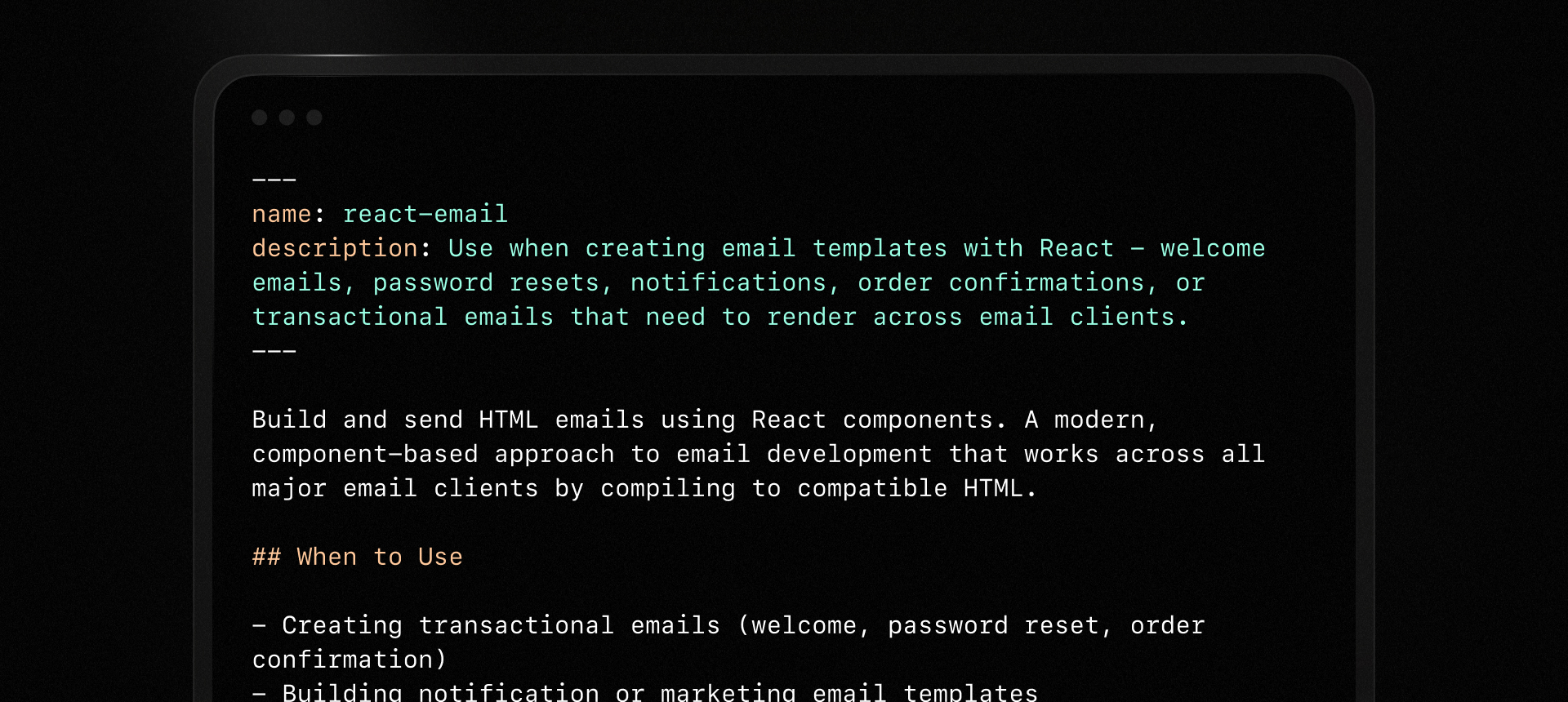 **Execution**: When a task matches a skill's description, the agent reads the full `SKILL.md` file. If the skill includes scripts, references, or assets, the agent can pull those in as needed.
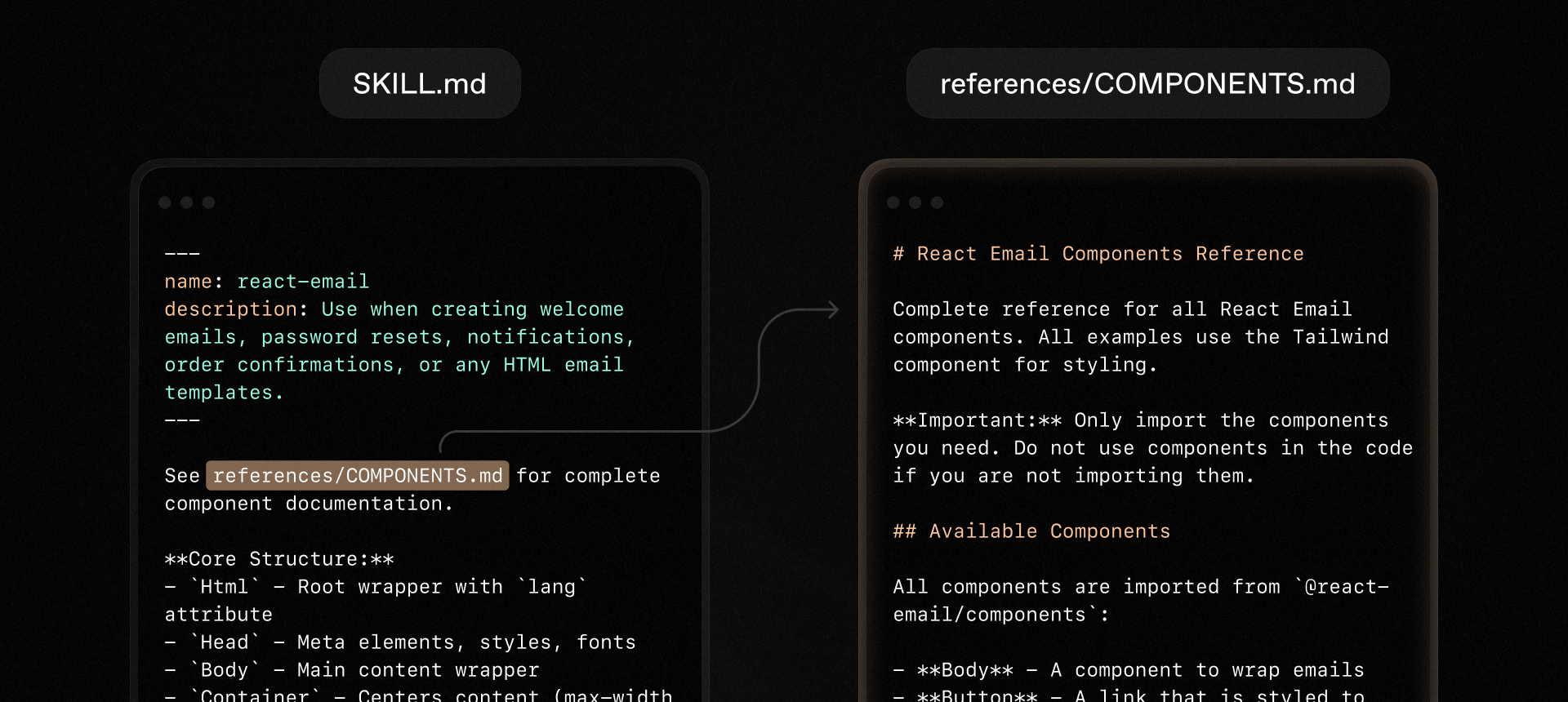 While agents can certainly perform complex tasks without expertise, this approach both requires the agent to keep track of much more context, and also depends on the agent's ability to search the web for information or rely upon generic training data.
Skills offer precise, expert, opinionated knowledge in a way that preserves context and allows for autonomy guided by expert knowledge.
## The skills we're introducing
Today we're releasing three skills:
### 1. Email Best Practices Skill
The [Email Best Practices skill](/docs/email-best-practices-skill) gives agents expert knowledge to build scalable email systems that reach the inbox and follow best email sending practices.
To install the skill, run:
```bash
npx skills add resend/email-best-practices
```
**What it covers:**
- **Authentication setup**: Step-by-step instructions for SPF, DKIM, and DMARC records
- **Email design**: Guidelines for transactional and marketing messages
- **Regulatory compliance**: CAN-SPAM, GDPR, CASL, and region-specific requirements
- **Event handling**: Processing delivery notifications, bounces, and complaints
- **List management**: Maintaining suppression lists and improving deliverability
### 2. React Email Skill
The [React Email skills](/docs/react-email-skill) helps agents build production-ready HTML emails using React email components. It follows our best practices for clean, maintainable, and well-designed email templates.
To install the skill, run:
```bash
npx skills add resend/react-email
```
**What it enables:**
- Component-driven architecture for consistent, reusable templates
- Tailwind CSS integration for brand-aligned designs
- Automatic HTML and plain text output
- Cross-client rendering that works in Gmail, Outlook, Apple Mail, and more
- Development preview server with hot reloading
### 3. Resend Skill
The [Resend skill](/docs/resend-skill) teaches agents how to send emails through the Resend API using our official recommendations for production-ready email sending.
To install the skill, run:
```bash
npx skills add resend/resend-skills
```
**What it enables:**
- Send individual emails or batch up to 100 at once
- Automatic retries with exponential backoff for transient failures
- Idempotency keys to prevent duplicate sends
- Support for Node.js, Python, Ruby, Go, and other SDKs
When your agent encounters an email-sending task, it activates this skill automatically—no manual configuration required.
## Agent experience (AX) is developer experience (DX)
We've spent years obsessing over developer experience: clear documentation, intuitive APIs, and fast support when things go wrong.
**[Agent experience (AX)](/blog/agent-experience) is the next frontier.**
Developers turn to agents to accelerate their work, but the acceleration is only helpful if the agent can perform the task correctly. **Agent skills close the expertise gap** without demanding developer attention or unnecessarily bloating the agent's context window.
The agent should know the right patterns, avoid common pitfalls, and produce code that works in production—not just in a demo. At their best, agent skills provide expertise, not just instructions, but the accumulated knowledge of how to build email systems that scale.
When an agent can quickly produce high-quality code, it's not just good agent experience; it's good developer experience.
## Get started
Install the skills and start building:
```bash
npx skills add resend/resend-skills
npx skills add resend/react-email
npx skills add resend/email-best-practices
```
These skills are living documents, and we're updating them regularly to keep them up to date with the latest best practices. As you use them, let us know how they can be improved so we can make them even better.
While agents can certainly perform complex tasks without expertise, this approach both requires the agent to keep track of much more context, and also depends on the agent's ability to search the web for information or rely upon generic training data.
Skills offer precise, expert, opinionated knowledge in a way that preserves context and allows for autonomy guided by expert knowledge.
## The skills we're introducing
Today we're releasing three skills:
### 1. Email Best Practices Skill
The [Email Best Practices skill](/docs/email-best-practices-skill) gives agents expert knowledge to build scalable email systems that reach the inbox and follow best email sending practices.
To install the skill, run:
```bash
npx skills add resend/email-best-practices
```
**What it covers:**
- **Authentication setup**: Step-by-step instructions for SPF, DKIM, and DMARC records
- **Email design**: Guidelines for transactional and marketing messages
- **Regulatory compliance**: CAN-SPAM, GDPR, CASL, and region-specific requirements
- **Event handling**: Processing delivery notifications, bounces, and complaints
- **List management**: Maintaining suppression lists and improving deliverability
### 2. React Email Skill
The [React Email skills](/docs/react-email-skill) helps agents build production-ready HTML emails using React email components. It follows our best practices for clean, maintainable, and well-designed email templates.
To install the skill, run:
```bash
npx skills add resend/react-email
```
**What it enables:**
- Component-driven architecture for consistent, reusable templates
- Tailwind CSS integration for brand-aligned designs
- Automatic HTML and plain text output
- Cross-client rendering that works in Gmail, Outlook, Apple Mail, and more
- Development preview server with hot reloading
### 3. Resend Skill
The [Resend skill](/docs/resend-skill) teaches agents how to send emails through the Resend API using our official recommendations for production-ready email sending.
To install the skill, run:
```bash
npx skills add resend/resend-skills
```
**What it enables:**
- Send individual emails or batch up to 100 at once
- Automatic retries with exponential backoff for transient failures
- Idempotency keys to prevent duplicate sends
- Support for Node.js, Python, Ruby, Go, and other SDKs
When your agent encounters an email-sending task, it activates this skill automatically—no manual configuration required.
## Agent experience (AX) is developer experience (DX)
We've spent years obsessing over developer experience: clear documentation, intuitive APIs, and fast support when things go wrong.
**[Agent experience (AX)](/blog/agent-experience) is the next frontier.**
Developers turn to agents to accelerate their work, but the acceleration is only helpful if the agent can perform the task correctly. **Agent skills close the expertise gap** without demanding developer attention or unnecessarily bloating the agent's context window.
The agent should know the right patterns, avoid common pitfalls, and produce code that works in production—not just in a demo. At their best, agent skills provide expertise, not just instructions, but the accumulated knowledge of how to build email systems that scale.
When an agent can quickly produce high-quality code, it's not just good agent experience; it's good developer experience.
## Get started
Install the skills and start building:
```bash
npx skills add resend/resend-skills
npx skills add resend/react-email
npx skills add resend/email-best-practices
```
These skills are living documents, and we're updating them regularly to keep them up to date with the latest best practices. As you use them, let us know how they can be improved so we can make them even better.