---
title: "Inbound Emails"
slug: inbound-emails
description: "Receive emails using webhooks. Parse content and attachments. Reply to your users."
created_at: "2025-11-03"
updated_at: "2025-11-03"
image: "https://cdn.resend.com/posts/inbound-emails.jpg"
humans: ["lucas-costa", "lucas-vieira", "giovana-yahiro", "felipe-volpone", "pedro-gomes", "vitor-capretz", "zeh-fernandes", "bu-kinoshita", "zeno-rocha"]
category: "product"
featured: true
---
Resend started by modernizing the way you **send emails**.
Today, we're making it easy for you to **receive emails** as well.
Inbound unlocks entirely new use cases like:
- Replying to in-app emails
- Processing forwarded attachments
- Receiving support emails from users
## How does it work?
First, determine the email address you want to use. You can either:
- Use your team's default inbound domain (e.g. `@.resend.app`)
- [Set up a custom domain](/docs/dashboard/receiving/custom-domains) (e.g. `example.com`)
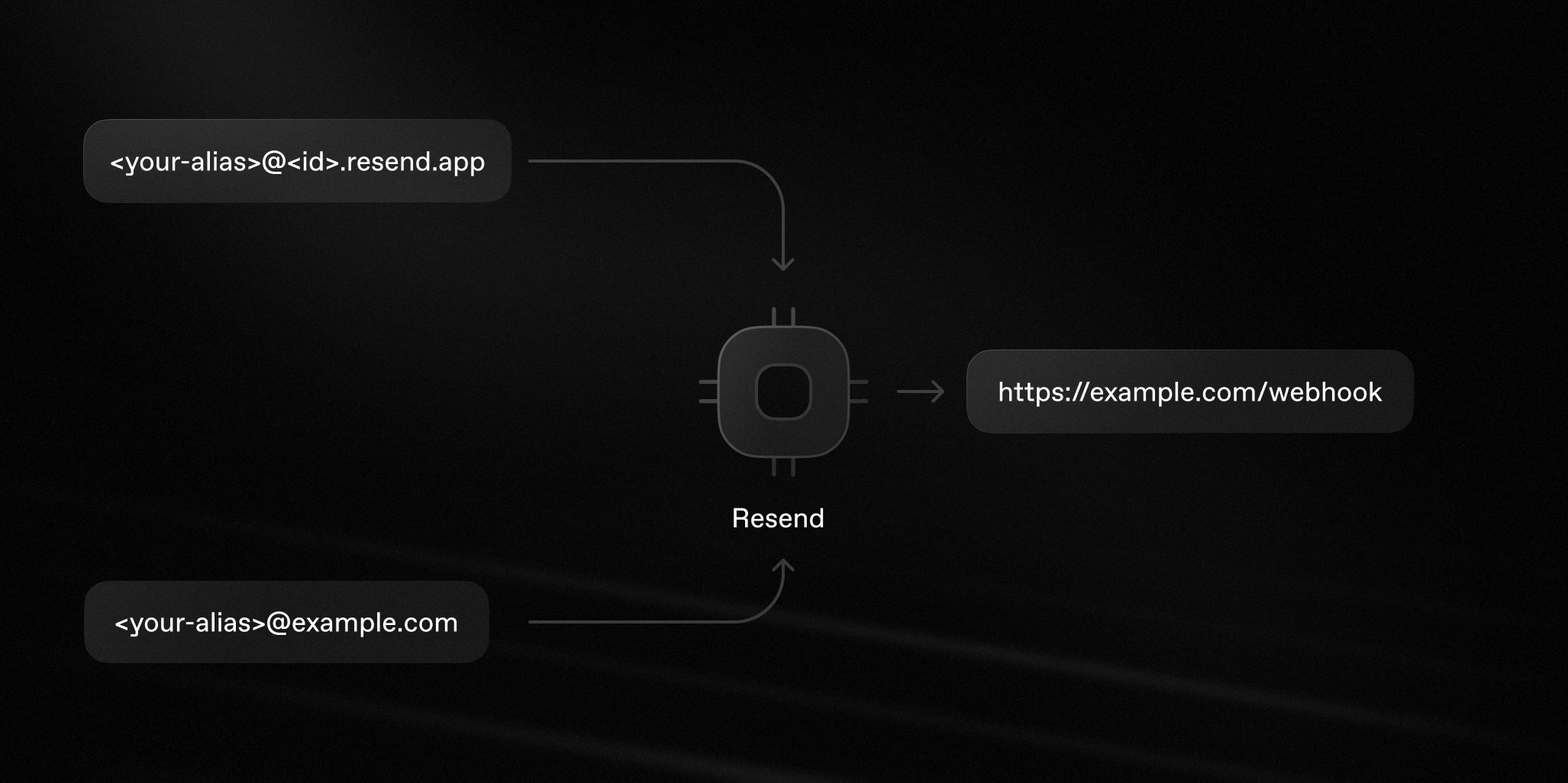
Resend processes all incoming emails to the provided address and then:
1. Parses the email content as JSON
2. Stores the attachment file(s)
3. Sends a JSON payload to an endpoint of your choice
## Getting started
Here's how to start receiving emails using Resend.
### 1. Get your email address
To help you get started quickly, Resend provides a `.resend.app` address, which is automatically created for you.
To find your Resend domain:
- Go to the [Receiving Emails](/emails/receiving) page.
- Click the **more options button** and select **Inbound address**.
Send emails to your inbound address and Resend will process them and send a JSON payload to your webhook.
Alternatively, for a more branded experience, you can also [set up a custom domain](/docs/dashboard/receiving/custom-domains) to receive emails.
### 2. Configure webhook
In your application, create a new route that can accept `POST` requests.
Next, [create a new webhook](/docs/dashboard/receiving/introduction#2-configure-webhooks) to receive events.
Enter your endpoint URL and select the `email.received` event.
### 3. Receive email events
Once you receive the email event, you can process the email and attachments metadata.
```json
{
"type": "email.received",
"created_at": "2024-02-22T23:41:12.126Z",
"data": {
"email_id": "56761188-7520-42d8-8898-ff6fc54ce618",
"created_at": "2024-02-22T23:41:11.894719+00:00",
"from": "Acme ",
"to": ["delivered@resend.dev"],
"bcc": [],
"cc": [],
"message_id": "",
"subject": "Sending this example",
"attachments": [
{
"id": "2a0c9ce0-3112-4728-976e-47ddcd16a318",
"filename": "avatar.png",
"content_type": "image/png",
"content_disposition": "inline",
"content_id": "img001"
}
]
}
}
```
## View received emails
All inbound emails are visible on the [emails](/emails/receiving) page. Resend will store your emails even if you don't configure a webhook, or if your webhook endpoint is down.
Emails can be filtered by their `to`, `from`, and `subject` fields. Click on an email to see its full details, including the HTML, Plain Text, and any attachments.
## Process forwarded attachments
Inbound email flows often involve processing attachments.
Users can forward airplane tickets, receipts, and expenses to you. Then, you can extract key information from attachments and use that data.
To do this, call the [Attachments API](/docs/api-reference/emails/list-received-email-attachments) when you receive the webhook event. That API will return a list of attachments with their metadata and a `download_url` that you can use to download the actual content.
```nodejs
import { Resend } from 'resend';
const resend = new Resend('re_xxxxxxxxx');
const { data, error } = await resend.emails.receiving.attachments.list({
emailId: '4ef9a417-02e9-4d39-ad75-9611e0fcc33c',
});
```
```php
$resend = Resend::client('re_xxxxxxxxx');
$resend->emails->receiving->attachments->list(
emailId: '4ef9a417-02e9-4d39-ad75-9611e0fcc33c'
);
```
```python
import resend
resend.api_key = 're_xxxxxxxxx'
attachments = resend.Emails.Receiving.Attachments.list(
email_id='4ef9a417-02e9-4d39-ad75-9611e0fcc33c'
)
```
```ruby
require 'resend'
Resend.api_key = 're_xxxxxxxxx'
attachments = Resend::Emails::Receiving::Attachments.list(
email_id: '4ef9a417-02e9-4d39-ad75-9611e0fcc33c'
)
```
```go
import (
"context"
"github.com/resend/resend-go/v3"
)
func main() {
client := resend.NewClient("re_xxxxxxxxx")
attachments, err := client.Emails.Receiving.ListAttachmentsWithContext(
context.TODO(),
"4ef9a417-02e9-4d39-ad75-9611e0fcc33c",
)
}
```
```rust
use resend_rs::{list_opts::ListOptions, Resend, Result};
#[tokio::main]
async fn main() -> Result<()> {
let resend = Resend::new("re_xxxxxxxxx");
let _email = resend
.receiving
.list_attachments(
"4ef9a417-02e9-4d39-ad75-9611e0fcc33c",
ListOptions::default(),
)
.await?;
Ok(())
}
```
```java
import com.resend.*;
public class Main {
public static void main(String[] args) {
Resend resend = new Resend("re_xxxxxxxxx");
ListAttachmentsResponse response = resend.receiving().listAttachments(
"4ef9a417-02e9-4d39-ad75-9611e0fcc33c"
);
}
}
```
```dotnet
using Resend;
IResend resend = ResendClient.Create( "re_xxxxxxxxx" ); // Or from DI
var resp = await resend.ReceivedEmailAttachmentListAsync( new Guid( "4ef9a417-02e9-4d39-ad75-9611e0fcc33c" ));
Console.WriteLine( "Nr Attachments={0}", resp.Content.Data.Count );
```
```curl
curl -X GET 'https://api.resend.com/emails/receiving/4ef9a417-02e9-4d39-ad75-9611e0fcc33c/attachments' \
-H 'Authorization: Bearer re_xxxxxxxxx'
```
## Get started today
We're excited to see the new features Inbound will empower you to build.
Visit the [Inbound API docs](/docs/dashboard/receiving/introduction) to get started.