---
title: "How to read a DMARC report"
slug: how-to-read-a-dmarc-report
description: "Learn how to read DMARC reports (RUA and RUF), interpret key XML fields, and use insights to protect your domain and improve email deliverability."
created_at: "2025-09-11"
updated_at: "2025-09-11"
image: https://cdn.resend.com/posts/how-to-read-a-dmarc-report.jpg
humans: ["brian-kerr"]
featured: false
category: "guides"
---
DMARC is an essential tool for **protecting your domain from email spoofing**.
It lives as a **DNS record** in your domain's DNS settings and lets you block bad actors, protect your domain, and receive detailed reports on any spoofing attempts.
We've previously covered the [basics of DMARC policies](/blog/dmarc-policy-modes), so in this article, we'll look at how to **read a DMARC report and take action to protect your domain**.
## What is DMARC?
[DMARC](/docs/dashboard/domains/dmarc) stands for Domain-based Message Authentication, Reporting & Conformance. It's an email authentication protocol that **prevents bad actors from spoofing your domain** while ensuring your legitimate emails reach their destination.
But here's what makes DMARC different from other email security measures: **it gives you data-driven insights into your email authentication**. While SPF and DKIM protect your emails, DMARC tells you exactly what's happening with every message sent from your domain.
**This reporting capability is what transforms DMARC from a simple security tool into a complete email monitoring system.** Without understanding these reports, you're missing the most powerful part of DMARC: the ability to see authentication patterns, spot potential threats, and optimize your email delivery.
## What are DMARC reports?
**DMARC reports are your window into email authentication** for email sent from your domain. When you set up DMARC reporting, you get access to detailed data about every email sent from your domain.
**This visibility is crucial for email security and deliverability.** You can see which emails are passing or failing authentication checks, where they're coming from, and how receiving mail servers are handling them. It helps you spot authentication issues, identify unauthorized use of your domain, and fine-tune your email setup.
## Types of DMARC reports
DMARC provides two distinct types of reports, each serving different monitoring needs. These correspond to two fields you can add to your DMARC record:
- `ruf`: forensic report for each email failing DMARC
- `rua`: aggregated report summarizing DMARC authentication results
When you [create your DMARC record](/docs/dashboard/domains/dmarc#1-add-a-txt-dmarc-record), you specify where to deliver these reports.
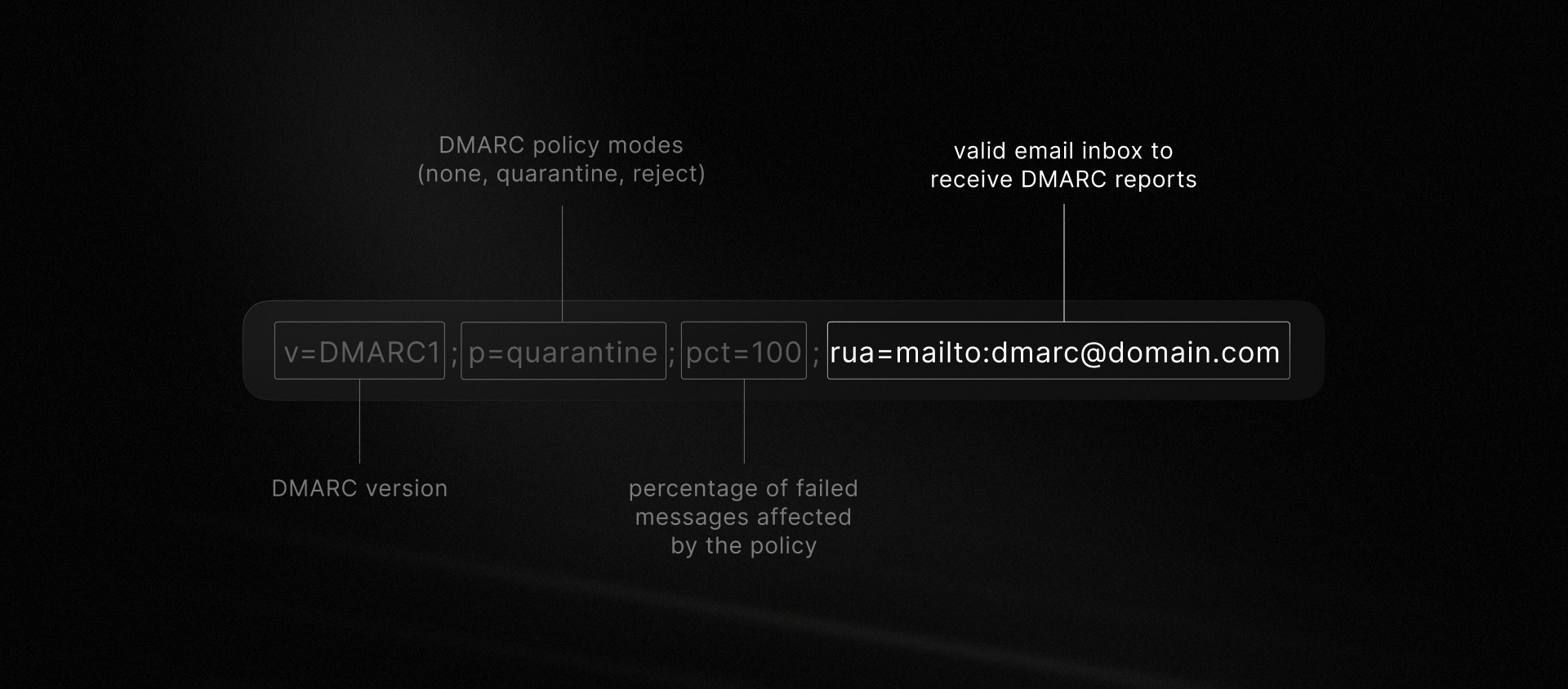 Teams often opt to receive reports in a shared operational email address and connect them to Slack alerts or a similar system.
### Forensic Reports (RUF)
RUF reports are generated **each time an email fails DMARC authentication** and contain detailed information about the specific failure. You can define a `ruf` field in your DMARC record to specify where to deliver these reports.
Teams often opt to receive reports in a shared operational email address and connect them to Slack alerts or a similar system.
### Forensic Reports (RUF)
RUF reports are generated **each time an email fails DMARC authentication** and contain detailed information about the specific failure. You can define a `ruf` field in your DMARC record to specify where to deliver these reports.
 **We generally don't recommend relying on RUF reports** for day-to-day monitoring. Here's why:
- **Limited availability**: Major providers like Gmail and Outlook don't send them due to privacy concerns
- **Overwhelming volume**: You could receive thousands of reports daily, making them difficult to process
- **Delayed delivery**: Providers often batch these reports, so you won't get real-time alerts
**When RUF reports can be useful:** Enable them if you're investigating specific authentication issues or suspect targeted spoofing attacks. They provide detailed forensic data that can help you understand exactly why certain emails are failing.
Just don't expect them to be your primary monitoring tool.
### Aggregate Reports (RUA)
RUA reports are generated **at regular intervals** (usually daily), regardless of whether or not there are failures. We strongly recommend using them to **monitor your email authentication**.
You can define a `rua` field in your DMARC record to tell email servers where to deliver these reports.
**We generally don't recommend relying on RUF reports** for day-to-day monitoring. Here's why:
- **Limited availability**: Major providers like Gmail and Outlook don't send them due to privacy concerns
- **Overwhelming volume**: You could receive thousands of reports daily, making them difficult to process
- **Delayed delivery**: Providers often batch these reports, so you won't get real-time alerts
**When RUF reports can be useful:** Enable them if you're investigating specific authentication issues or suspect targeted spoofing attacks. They provide detailed forensic data that can help you understand exactly why certain emails are failing.
Just don't expect them to be your primary monitoring tool.
### Aggregate Reports (RUA)
RUA reports are generated **at regular intervals** (usually daily), regardless of whether or not there are failures. We strongly recommend using them to **monitor your email authentication**.
You can define a `rua` field in your DMARC record to tell email servers where to deliver these reports.
 **RUA reports give you comprehensive visibility into your domain's email activity.** Any email server that has received emails from your domain during the reporting period will send a report. Here's what they help you identify:
- **Authentication gaps**: Groups within your organization that may not be properly authenticating emails
- **Sending patterns**: Overall trends and volumes in your outgoing email traffic
- **Security threats**: Spoofing attempts and unauthorized use of your domain
**This makes RUA reports essential for ongoing email security monitoring** and the foundation of any DMARC strategy.
## How to read a DMARC report
While XML is meant to be human-readable, it can be challenging to read without context, so let's walk through each section of the report to understand what it means.
Understanding the different fields in a DMARC report is a crucial first step towards taking control of your email. To meaningfully improve your inbox delivery rate, however, you must dig into inconsistencies and take action.
## How to Interpret a DMARC Report
Our sample report is an RUA, or aggregate report, best for understanding the big picture of your emails. What should we look for in this report, and what can we learn from it? Let's answer that question both generally and specifically.
**General: observe sending patterns**
Aggregate reports (RUA) expose meaningful patterns in your sending behavior and provide clues about how to improve your inbox delivery rate. While not always predictable, what happens to your emails is typically determined by several factors:
- your [DKIM](https://resend.com/docs/dashboard/domains/introduction#what-are-dkim-records) and [SPF](https://resend.com/docs/dashboard/domains/introduction#what-are-spf-records) alignment mode
- your [DMARC policy for that subdomain](https://resend.com/blog/how-dmarc-applies-to-subdomains)
- and the result of DKIM and SPF checks
A receiving email server evaluates all of these factors, as well as the history of emails from the root domain and then decides what to do with the email.
**RUA reports give you comprehensive visibility into your domain's email activity.** Any email server that has received emails from your domain during the reporting period will send a report. Here's what they help you identify:
- **Authentication gaps**: Groups within your organization that may not be properly authenticating emails
- **Sending patterns**: Overall trends and volumes in your outgoing email traffic
- **Security threats**: Spoofing attempts and unauthorized use of your domain
**This makes RUA reports essential for ongoing email security monitoring** and the foundation of any DMARC strategy.
## How to read a DMARC report
While XML is meant to be human-readable, it can be challenging to read without context, so let's walk through each section of the report to understand what it means.
Understanding the different fields in a DMARC report is a crucial first step towards taking control of your email. To meaningfully improve your inbox delivery rate, however, you must dig into inconsistencies and take action.
## How to Interpret a DMARC Report
Our sample report is an RUA, or aggregate report, best for understanding the big picture of your emails. What should we look for in this report, and what can we learn from it? Let's answer that question both generally and specifically.
**General: observe sending patterns**
Aggregate reports (RUA) expose meaningful patterns in your sending behavior and provide clues about how to improve your inbox delivery rate. While not always predictable, what happens to your emails is typically determined by several factors:
- your [DKIM](https://resend.com/docs/dashboard/domains/introduction#what-are-dkim-records) and [SPF](https://resend.com/docs/dashboard/domains/introduction#what-are-spf-records) alignment mode
- your [DMARC policy for that subdomain](https://resend.com/blog/how-dmarc-applies-to-subdomains)
- and the result of DKIM and SPF checks
A receiving email server evaluates all of these factors, as well as the history of emails from the root domain and then decides what to do with the email.
 In the end, the server determines its `disposition` towards failing emails for each subdomain based on the whole picture. Your DMARC policy is like a recommendation, but the `disposition` is the receiving server's final decision.
These patterns show in a RUA DMARC report.
**Specific: case study**
Using our example, let's see how you can analyze a DMARC report to identify harmful sending patterns.
First, let's look at the **DMARC policies** in the report. These defaults are a helpful starting point, as they help you understand how you're instructing mail servers to handle emails that fail DKIM and SPF.
The incoming mail server observed two main categories of DMARC policy:
1. **Root domain**: policy of `quarantine`. In theory, any emails from company.com that fail DKIM or SPF checks should be sent to spam.
```xml
company.com
r
r
--highlight-start
In the end, the server determines its `disposition` towards failing emails for each subdomain based on the whole picture. Your DMARC policy is like a recommendation, but the `disposition` is the receiving server's final decision.
These patterns show in a RUA DMARC report.
**Specific: case study**
Using our example, let's see how you can analyze a DMARC report to identify harmful sending patterns.
First, let's look at the **DMARC policies** in the report. These defaults are a helpful starting point, as they help you understand how you're instructing mail servers to handle emails that fail DKIM and SPF.
The incoming mail server observed two main categories of DMARC policy:
1. **Root domain**: policy of `quarantine`. In theory, any emails from company.com that fail DKIM or SPF checks should be sent to spam.
```xml
company.com
r
r
--highlight-start
quarantine
--highlight-end
reject
100
```
2. **Default subdomain policy**: set to `reject` if no specific policy is defined. Emails from subdomains that fail auth checks should bounce.
```xml
company.com
r
r
quarantine
--highlight-start
reject
--highlight-end
100
```
Learn more about [the `sp` tag and how DMARC applies to subdomains](/blog/how-dmarc-applies-to-subdomains).
Second, **observing the email delivery outcomes** is crucial for getting the most out of DMARC reports.
The decision of the receiving mail server is called the `disposition`, which can be one of the following values:
- `none`: the email was sent to the inbox
- `quarantine`: the email was sent to the spam folder
- `reject`: the email was rejected (i.e., bounced)
Your DMARC policy only suggests how mail servers should handle emails that fail DKIM and SPF checks. Ultimately, the email server's `disposition` determines the actual outcome of the email delivery. Notice how the `disposition` values mimic DMARC policy value names.
1. Successful delivery
Why do emails land in the inbox? Because the receiving mail server makes the ultimate decision, sometimes emails can be successfully delivered to the inbox, even if they fail authentication.
**Example 1: Fully passing record**
All emails from `mail.company.com` passed auth checks. Importantly, the receiving server's `disposition` is `none`, which means no action would be taken on failing checks anyway. All of these emails were delivered.
```xml
--highlight-start
none
--highlight-end
pass
pass
```
**Example 2: Partially passing record**
The report for the root domain `company.com` also shows that all emails were delivered, but not all emails passed `spf`. The receiving server upgraded the root domain disposition to `none` (from the domain's DMARC policy `quarantine`), so even emails that failed SPF checks were delivered.
```xml
--highlight-start
none
--highlight-end
pass
--highlight-start
fail
--highlight-end
```
2. Unsuccessful delivery
Why do mail servers bounce the email or send it to spam? Again, let's look at two examples.
**Example 1: emails sent to spam (quarantine)**
An unknown number of emails from `marketing.company.com` failed some auth checks. The report shows the receiver's disposition is `quarantine`.
```xml
--highlight-start
quarantine
fail
--highlight-end
pass
```
Marketing emails that failed DMARC checks went to recipients' spam folders.
**Example 2: emails bounced (reject)**
The subdomain `support.company.com` also had some auth check failures, but the receiver's disposition is `reject`.
```xml
--highlight-start
reject
--highlight-end
fail
fail
```
Failing emails from the support subdomain were not delivered at all.
Third, these results **offer a few important lessons**:
- **A significant number of emails are failing authentication**, both from the root domain and subdomains. Let's ensure all of your domains are properly authenticated, continue monitoring, and follow up if issues continue.
- **The receiving server trusts the root domain,** as it upgraded the `disposition` for the root domain and two subdomains. We have some failures in this report, but our reputation is still strong.
- **Marketing emails that failed checks are still accessible to recipients if they open their spam folders.** It's not ideal, but this issue is likely an easy fix. (Bonus points if you noticed that the `header_from` subdomain is a .net address. That may be the whole problem!)
- **The receiving server is enforcing a higher standard for customer support emails.** These emails often contain personally identifiable information and carry higher risk of phishing attacks, so it benefits everyone to hold them to a higher standard. It also means any failures are important to investigate.
Again, these are aggregate results. The RUA report doesn't explain why specific emails failed. If you receive forensic reports (RUF), you can get more information on individual emails, but in most cases, you'll need to watch trends and ask questions to get at the root of what's really happening.
## Conclusion
**DMARC reports are your roadmap to better email security and deliverability.** Here's how to make the most of them:
- **Start with aggregate reports (RUA)**: Review them weekly to spot trends and authentication issues. Look for patterns in failed authentication attempts and investigate any unexpected sources sending from your domain.
- **Take action on what you find**: Authentication failures often point to configuration issues that you can fix. Spoofing attempts may require updating your DMARC policy to be more restrictive.
- **Monitor consistently**: Individual reports show snapshots, but analyzing multiple reports over time reveals the real story of your email authentication health.
**Ready to dive deeper?** Check our [DMARC docs](/docs/dashboard/domains/dmarc) for setup guidance, or [contact our support team](/support) if you need help interpreting your specific reports.