---
title: "Broadcast API"
slug: broadcast-api
description: "Create, edit, and send broadcasts from the API."
created_at: "2025-03-26"
updated_at: "2025-03-26"
image: https://cdn.resend.com/posts/broadcast-api.jpg
humans: ["zeh-fernandes", "alexandre-cisneiros"]
featured: false
category: "product"
---
When we first launched our no-code email editor, [Broadcasts](/features/broadcasts), we focused on building the best user experience. We introduced familiar modern editor patterns and have continued adding new components ([Section](/changelog/new-section-component), [Code Block](/changelog/new-code-block-component), [YouTube](/changelog/new-youtube-component), and [𝕏](/changelog/new-x-twitter-component)) and details.
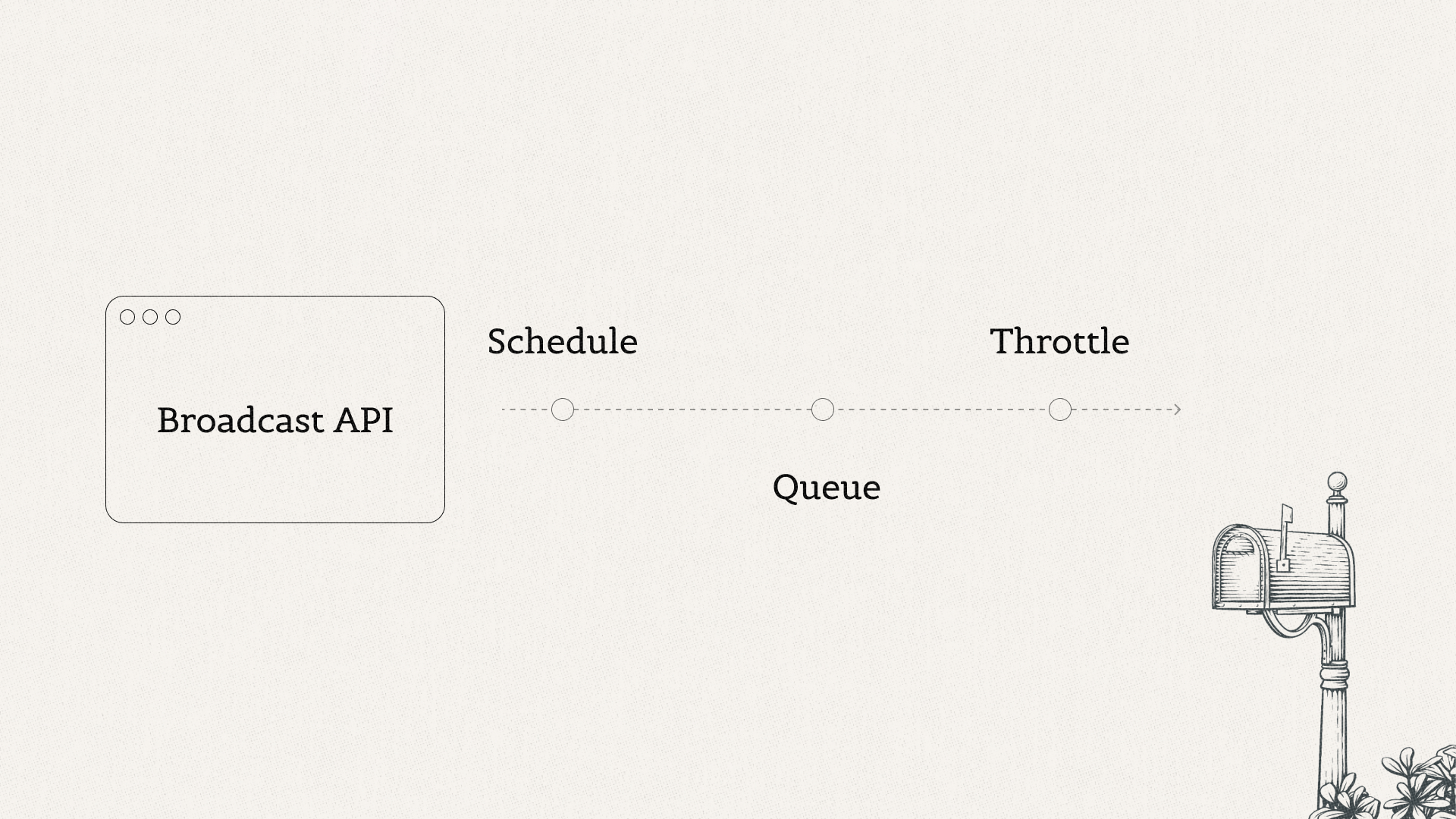
Behind Broadcasts lies a quietly powerful system that can queue, throttle, and send millions of emails, gather and display engagement metrics, and more.
 ## Enabling developers
Today, we're excited to expose the **full broadcast experience to developers**. Send HTML, plain text, or React (with the Node.js SDK) to any audience.
## Available in all languages
As with all endpoints, the Broadcast API enjoys **full SDK coverage**.
```nodejs
import { Resend } from 'resend';
const resend = new Resend('re_xxxxxxxxx');
await resend.broadcasts.create({
audienceId: '78261eea-8f8b-4381-83c6-79fa7120f1cf',
from: 'Acme ',
subject: 'hello world',
html: 'Hi {{{FIRST_NAME|there}}}, you can unsubscribe here: {{{RESEND_UNSUBSCRIBE_URL}}}',
});
```
```ruby
require "resend"
Resend.api_key = "re_xxxxxxxxx"
params = {
"audience_id": "78261eea-8f8b-4381-83c6-79fa7120f1cf",
"from": "Acme ",
"subject": "hello world",
"html": "Hi #{FIRST_NAME}, you can unsubscribe here: #{RESEND_UNSUBSCRIBE_URL}",
}
Resend::Broadcasts.create(params)
```
```php
$resend = Resend::client('re_xxxxxxxxx');
$resend->broadcasts->create([
'audience_id' => '78261eea-8f8b-4381-83c6-79fa7120f1cf',
'from' => 'Acme ',
'subject' => 'hello world',
'html' => 'Hi {{{FIRST_NAME|there}}}, you can unsubscribe here: {{{RESEND_UNSUBSCRIBE_URL}}}',
]);
```
```python
import resend
resend.api_key = "re_xxxxxxxxx"
params: resend.Broadcasts.CreateParams = {
"audience_id": "78261eea-8f8b-4381-83c6-79fa7120f1cf",
"from": "Acme ",
"subject": "Hello, world!",
"html": f'Hi {FIRST_NAME}, you can unsubscribe here: {RESEND_UNSUBSCRIBE_URL}',
}
resend.Broadcasts.create(params)
```
```go
import "fmt"
import "github.com/resend/resend-go/v2"
client := resend.NewClient("re_xxxxxxxxx")
params := &resend.CreateBroadcastRequest{
AudienceId: "78261eea-8f8b-4381-83c6-79fa7120f1cf",
From: "Acme ",
Html: fmt.Sprintf("Hi %s, you can unsubscribe here: %s", FIRST_NAME, RESEND_UNSUBSCRIBE_URL),
Subject: "Hello, world!",
}
broadcast, _ := client.Broadcasts.Create(params)
```
```rust
use resend_rs::{types::CreateBroadcastOptions, Resend, Result};
#[tokio::main]
async fn main() -> Result<()> {
let resend = Resend::new("re_xxxxxxxxx");
let audience_id = "78261eea-8f8b-4381-83c6-79fa7120f1cf";
let from = "Acme ";
let subject = "hello world";
let html = "Hi {{{FIRST_NAME|there}}}, you can unsubscribe here: {{{RESEND_UNSUBSCRIBE_URL}}}";
let opts = CreateBroadcastOptions::new(audience_id, from, subject).with_html(html);
let _broadcast = resend.broadcasts.create(opts).await?;
Ok(())
}
```
```java
Resend resend = new Resend("re_xxxxxxxxx");
CreateBroadcastOptions params = CreateBroadcastOptions.builder()
.audienceId("78261eea-8f8b-4381-83c6-79fa7120f1cf")
.from("Acme ")
.subject("hello world")
.html("Hi {{{FIRST_NAME|there}}}, you can unsubscribe here: {{{RESEND_UNSUBSCRIBE_URL}}}")
.build();
CreateBroadcastResponseSuccess data = resend.broadcasts().create(params);
```
```dotnet
using Resend;
IResend resend = ResendClient.Create( "re_xxxxxxxxx" );
var resp = await resend.BroadcastAddAsync(
new BroadcastData()
{
DisplayName = "Example Broadcast",
AudienceId = new Guid( "78261eea-8f8b-4381-83c6-79fa7120f1cf" ),
From = "Acme ",
Subject = "Hello, world!",
HtmlBody = "Hi {{{FIRST_NAME|there}}}, you can unsubscribe here: {{{RESEND_UNSUBSCRIBE_URL}}}",
}
);
Console.WriteLine( "Broadcast Id={0}", resp.Content );
```
```curl
curl -X POST 'https://api.resend.com/broadcasts' \\
-H 'Authorization: Bearer re_xxxxxxxxx' \\
-H 'Content-Type: application/json' \\
-d $'{
"audience_id": "78261eea-8f8b-4381-83c6-79fa7120f1cf",
"from": "Acme ",
"subject": "hello world",
"html": "Hi {{{FIRST_NAME|there}}}, you can unsubscribe here: {{{RESEND_UNSUBSCRIBE_URL}}}"
}'
```
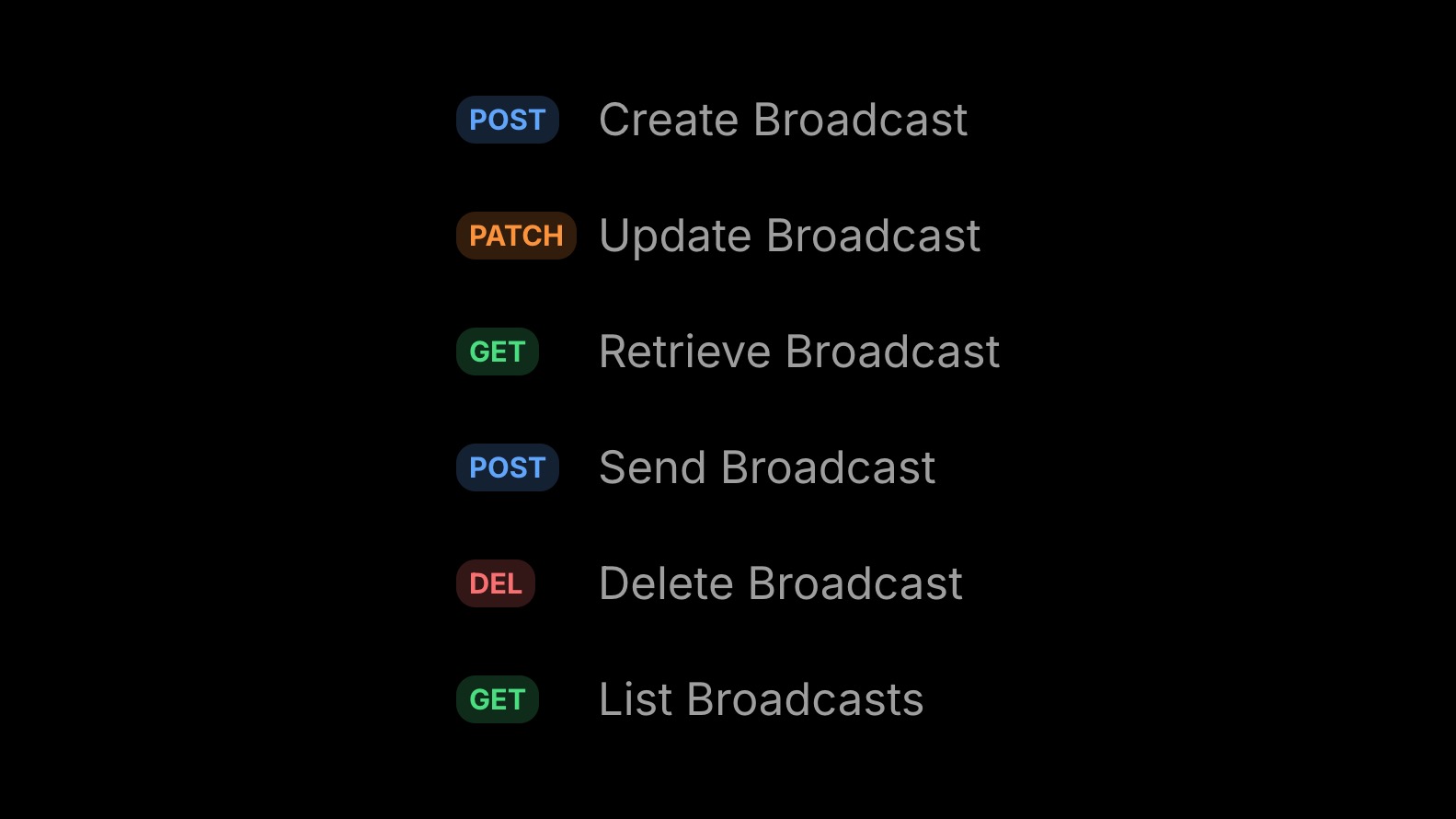
The Broadcast API offers [6 endpoints](/docs/api-reference/broadcasts/create-broadcast) for creating, updating, and sending broadcasts.
## Enabling developers
Today, we're excited to expose the **full broadcast experience to developers**. Send HTML, plain text, or React (with the Node.js SDK) to any audience.
## Available in all languages
As with all endpoints, the Broadcast API enjoys **full SDK coverage**.
```nodejs
import { Resend } from 'resend';
const resend = new Resend('re_xxxxxxxxx');
await resend.broadcasts.create({
audienceId: '78261eea-8f8b-4381-83c6-79fa7120f1cf',
from: 'Acme ',
subject: 'hello world',
html: 'Hi {{{FIRST_NAME|there}}}, you can unsubscribe here: {{{RESEND_UNSUBSCRIBE_URL}}}',
});
```
```ruby
require "resend"
Resend.api_key = "re_xxxxxxxxx"
params = {
"audience_id": "78261eea-8f8b-4381-83c6-79fa7120f1cf",
"from": "Acme ",
"subject": "hello world",
"html": "Hi #{FIRST_NAME}, you can unsubscribe here: #{RESEND_UNSUBSCRIBE_URL}",
}
Resend::Broadcasts.create(params)
```
```php
$resend = Resend::client('re_xxxxxxxxx');
$resend->broadcasts->create([
'audience_id' => '78261eea-8f8b-4381-83c6-79fa7120f1cf',
'from' => 'Acme ',
'subject' => 'hello world',
'html' => 'Hi {{{FIRST_NAME|there}}}, you can unsubscribe here: {{{RESEND_UNSUBSCRIBE_URL}}}',
]);
```
```python
import resend
resend.api_key = "re_xxxxxxxxx"
params: resend.Broadcasts.CreateParams = {
"audience_id": "78261eea-8f8b-4381-83c6-79fa7120f1cf",
"from": "Acme ",
"subject": "Hello, world!",
"html": f'Hi {FIRST_NAME}, you can unsubscribe here: {RESEND_UNSUBSCRIBE_URL}',
}
resend.Broadcasts.create(params)
```
```go
import "fmt"
import "github.com/resend/resend-go/v2"
client := resend.NewClient("re_xxxxxxxxx")
params := &resend.CreateBroadcastRequest{
AudienceId: "78261eea-8f8b-4381-83c6-79fa7120f1cf",
From: "Acme ",
Html: fmt.Sprintf("Hi %s, you can unsubscribe here: %s", FIRST_NAME, RESEND_UNSUBSCRIBE_URL),
Subject: "Hello, world!",
}
broadcast, _ := client.Broadcasts.Create(params)
```
```rust
use resend_rs::{types::CreateBroadcastOptions, Resend, Result};
#[tokio::main]
async fn main() -> Result<()> {
let resend = Resend::new("re_xxxxxxxxx");
let audience_id = "78261eea-8f8b-4381-83c6-79fa7120f1cf";
let from = "Acme ";
let subject = "hello world";
let html = "Hi {{{FIRST_NAME|there}}}, you can unsubscribe here: {{{RESEND_UNSUBSCRIBE_URL}}}";
let opts = CreateBroadcastOptions::new(audience_id, from, subject).with_html(html);
let _broadcast = resend.broadcasts.create(opts).await?;
Ok(())
}
```
```java
Resend resend = new Resend("re_xxxxxxxxx");
CreateBroadcastOptions params = CreateBroadcastOptions.builder()
.audienceId("78261eea-8f8b-4381-83c6-79fa7120f1cf")
.from("Acme ")
.subject("hello world")
.html("Hi {{{FIRST_NAME|there}}}, you can unsubscribe here: {{{RESEND_UNSUBSCRIBE_URL}}}")
.build();
CreateBroadcastResponseSuccess data = resend.broadcasts().create(params);
```
```dotnet
using Resend;
IResend resend = ResendClient.Create( "re_xxxxxxxxx" );
var resp = await resend.BroadcastAddAsync(
new BroadcastData()
{
DisplayName = "Example Broadcast",
AudienceId = new Guid( "78261eea-8f8b-4381-83c6-79fa7120f1cf" ),
From = "Acme ",
Subject = "Hello, world!",
HtmlBody = "Hi {{{FIRST_NAME|there}}}, you can unsubscribe here: {{{RESEND_UNSUBSCRIBE_URL}}}",
}
);
Console.WriteLine( "Broadcast Id={0}", resp.Content );
```
```curl
curl -X POST 'https://api.resend.com/broadcasts' \\
-H 'Authorization: Bearer re_xxxxxxxxx' \\
-H 'Content-Type: application/json' \\
-d $'{
"audience_id": "78261eea-8f8b-4381-83c6-79fa7120f1cf",
"from": "Acme ",
"subject": "hello world",
"html": "Hi {{{FIRST_NAME|there}}}, you can unsubscribe here: {{{RESEND_UNSUBSCRIBE_URL}}}"
}'
```
The Broadcast API offers [6 endpoints](/docs/api-reference/broadcasts/create-broadcast) for creating, updating, and sending broadcasts.
 ## Review in the no-code editor
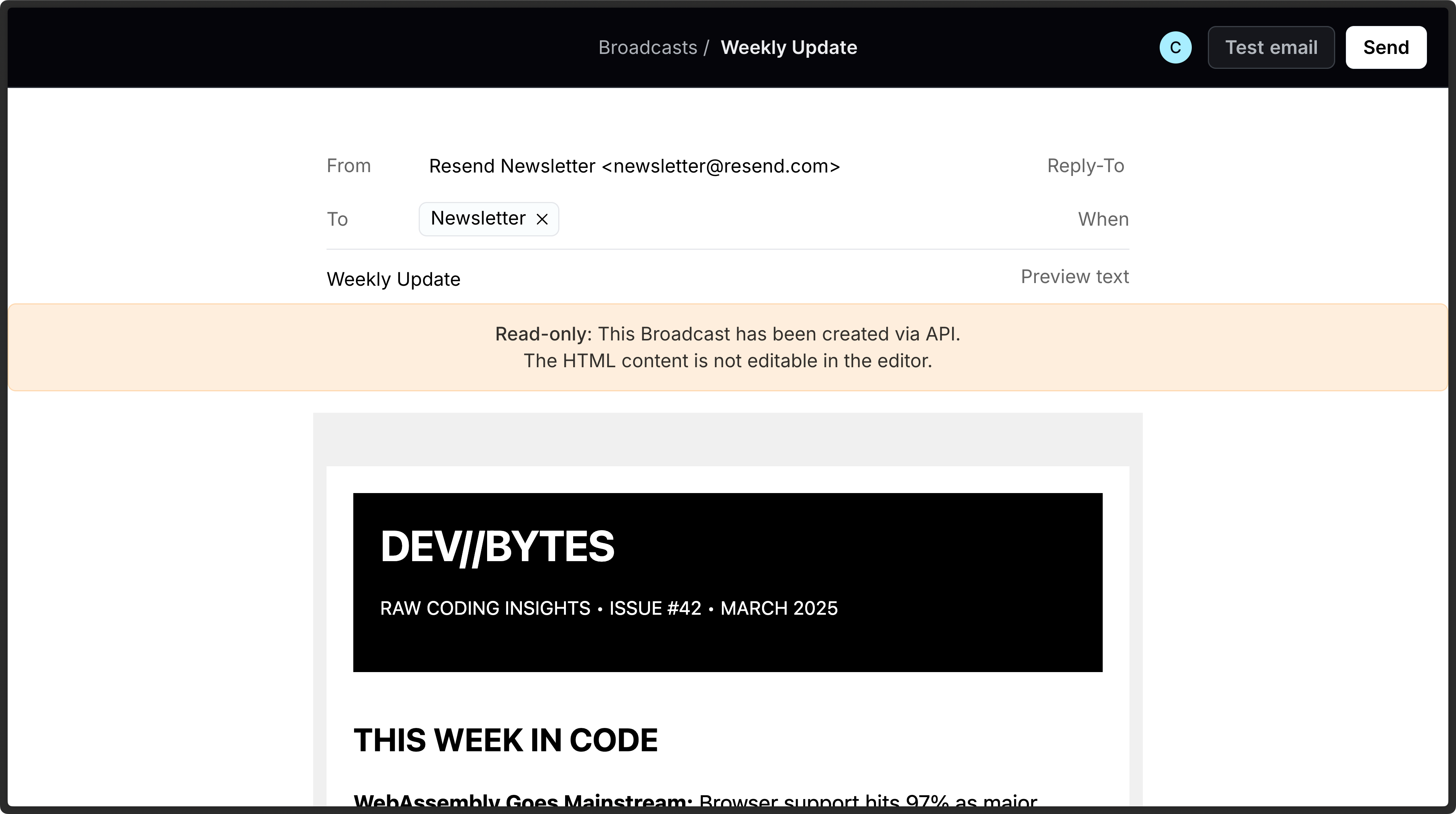
All broadcasts created with the API can be reviewed in the no-code editor before sending.
## Review in the no-code editor
All broadcasts created with the API can be reviewed in the no-code editor before sending.
 ## Building broadcast integrations
Full API coverage means you can build integrations with your product or web apps:
- Enable your users to create and send broadcasts without leaving your product
- Generate broadcasts programmatically for internal use
- Trigger broadcasts based on events in your app
You can build and send broadcasts with the API and let the Broadcast infrastructure handle the queue, throttle, and scheduling implementation.
## Audience management
Just like the visual editor, the Broadcast API uses [Audiences](/docs/api-reference/audiences/create-audience) to manage your recipients.
## Building broadcast integrations
Full API coverage means you can build integrations with your product or web apps:
- Enable your users to create and send broadcasts without leaving your product
- Generate broadcasts programmatically for internal use
- Trigger broadcasts based on events in your app
You can build and send broadcasts with the API and let the Broadcast infrastructure handle the queue, throttle, and scheduling implementation.
## Audience management
Just like the visual editor, the Broadcast API uses [Audiences](/docs/api-reference/audiences/create-audience) to manage your recipients.
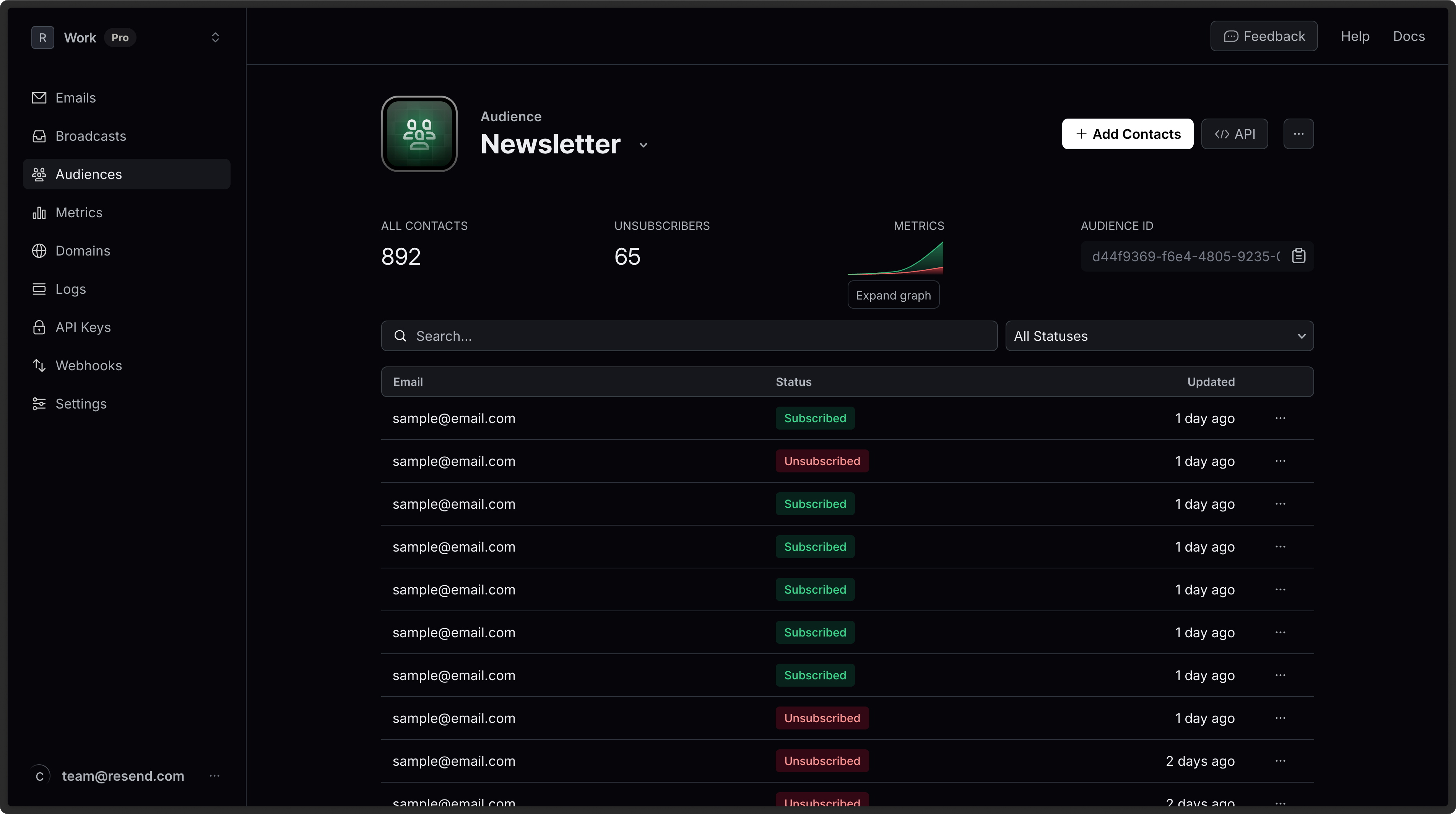 [Audience endpoints](/docs/api-reference/audiences/create-audience) let you control audiences and contacts programmatically.
When creating broadcasts, you can include dynamic audience data to personalize the email content.
- `{{{FIRST_NAME|fallback}}}`
- `{{{LAST_NAME|fallback}}}`
- `{{{EMAIL}}}`
- `{{{RESEND_UNSUBSCRIBE_URL}}}`
When you include the `{{{RESEND_UNSUBSCRIBE_URL}}}` placeholder in the call, Resend includes an unsubscribe link in the email to automatically handle unsubscribe requests.
## Limitations
Broadcasts created with the API are distinct from those created in the visual editor. While you can view all Broadcasts using the API or the visual editor, you can only edit and send broadcasts from the location they were created.
## Get started today
We're excited to see what you'll create and send.
Visit the [Broadcasts API docs](/docs/api-reference/broadcasts/create-broadcast) to get started.
[Audience endpoints](/docs/api-reference/audiences/create-audience) let you control audiences and contacts programmatically.
When creating broadcasts, you can include dynamic audience data to personalize the email content.
- `{{{FIRST_NAME|fallback}}}`
- `{{{LAST_NAME|fallback}}}`
- `{{{EMAIL}}}`
- `{{{RESEND_UNSUBSCRIBE_URL}}}`
When you include the `{{{RESEND_UNSUBSCRIBE_URL}}}` placeholder in the call, Resend includes an unsubscribe link in the email to automatically handle unsubscribe requests.
## Limitations
Broadcasts created with the API are distinct from those created in the visual editor. While you can view all Broadcasts using the API or the visual editor, you can only edit and send broadcasts from the location they were created.
## Get started today
We're excited to see what you'll create and send.
Visit the [Broadcasts API docs](/docs/api-reference/broadcasts/create-broadcast) to get started.